
In this post, I will cover:
- What are AI Agents?
- What is a Multi AI-Agent system?
- What is CrewAI?
- AI Agent using CrewAI.
- Creating a Project with CrewAI.
- Practical: Writing a Person’s Biography.
What are AI Agents?
An AI Agent is essentially an LLM (Large Language Model) with access to Tools. These Tools allow the Agent to interact with the external world, performing Tasks such as web searches, web scraping, using APIs, among others.
When given a specific Task, the Agent can decide whether and how to use the available Tools to achieve its goal. In the future, I will cover more details about Tools in another post.

What is a Multi AI-Agent system?
In a Multi AI-Agent system, two or more Agents cooperate to achieve a final goal. This system can be orchestrated in different ways, with three of the most common being: Sequential, Hierarchical, and Hybrid.
- Sequential Process: Tasks are executed linearly, meaning one after another. Imagine you want to generate a Marketing Email for a Lead. You can create three Agents and run them in sequence:
- The first Agent researches the Lead.
- The second Agent generates a summary based on the research.
- A third Agent writes the Email using the summary.
- Hierarchical Process: One Agent acts as a Manager, supervising and delegating improvements for each Task executed by the other Agents. Applying the same example above:
- The Manager reviews the research done by the first Agent, suggesting improvements or approving the task.
- Next, they review the summary generated by the second Agent, also suggesting adjustments or approving it.
- Finally, they evaluate the email created by the third agent, ensuring it is suitable before finalizing.
- Hybrid Process: It is the combination of both approaches, meaning you can use either the Sequential or the Hierarchical process as needed.

What is CrewAI?
CrewAI is a Python framework that simplifies the creation of Multi AI-Agent systems. One of its main advantages is its ease of use and the wide range of available Tools.
Additionally, CrewAI provides caching and memory layers, support for Agent training and testing, Flows creation, and many other features. This means that when developing a Multi AI-Agent system with this platform, you don’t need to worry about these complexities.
AI Agent using CrewAI
To create an AI Agent in CrewAI, you need to define a Role, a Goal, and a Backstory.
- Role: The Agent’s function and responsibility.
- Goal: The goal the Agent must achieve.
- Backstory: The Agent’s historical context and experiences.
In addition to creating the Agent itself, it’s necessary to define the Task the Agent will perform. In CrewAI, every task needs to have a Description, the Expected Output, and the Agent responsible for executing it.
When your Agents and Tasks are defined, you can build a Crew. A Crew combines all the Agents and Tasks and executes them according to the defined process type—sequential, hierarchical, among others.
Now, let’s get our hands dirty! 🚀
Creating a Project with CrewAI
To install CrewAI and the Tools, use the following command in the terminal:
pip install crewai crewai-toolsTo create a base project with CrewAI, use the following command:
crewai create crew <crew_name>When you run this command in the terminal, you will need to select the provider (OpenAI, Anthropic, Gemini, among others) and one of the LLM models from the chosen provider. If the selected options require an API Key, you can provide it directly in the terminal.
After creating the project, CrewAI takes care of setting up the entire structure for you. The image below illustrates the structure created for the project I created, called biography.
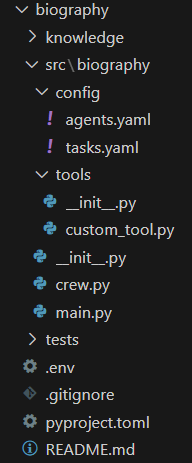
config/: contains YAML files with the definitions of Agents and Tasks.tools/: contains thecustom_tool.pyfile where you can create custom Tools.crew.py: file where you actually create your Agents, Tasks, and group them into a Crew.main.py: main file for running your application.
Let’s dive into a practical example 🚀, where I will detail the creation of a Multi AI-Agent system.
Practical: Writing a Person’s Biography.
For this system, two Agents were created: a writer and a biographer. As mentioned in the previous section, these Agents are defined in the agents.yaml file, located in the config folder. In the file, the placeholder {person} is used, which will be replaced by the value provided—in this case, Lionel Messi, as part of our practical example. This same concept of placeholders applies to the YAML file for the Tasks as well. Below is the YAML file content for the Agents.
writer:
  role: >
    Specialist Writer
  goal: >
    Generate a summary containing detailed information about {person}.
  backstory: >
    You are a highly skilled professional with over 10 years of experience,
    specialized in creating detailed summaries about individuals. Your goal is
    to provide accurate and well-structured content, gathering relevant
    information in a clear and concise manner, adapting to the context and needs.

specialist_biographer:
  role: >
    Specialist Biographer
  goal: >
    Generate a complete and well-structured biography about {person}, including
    their main achievements, experiences, and milestones.
  backstory: >
    You are a professional with extensive experience in creating detailed
    biographies that capture the essence and journey of a person. You use
    reliable sources and in-depth research techniques to gather information
    about key achievements, experiences, and life milestones. With a refined
    ability to structure clear and engaging narratives, your goal is to present
    a comprehensive and accurate view of each individual, highlighting their
    contributions and impact over time.
Each Agent will perform a Task. Two Tasks have been defined: write and biography. The Tasks are specified in the tasks.yaml file, located in the config folder. Below is the YAML file content for the tasks.
write_task:
  description: >
    Your goal is to generate a detailed summary about {person}, covering as many
    of the following topics as possible:

    - Full name, date of birth, and place of residence.
    - Main academic qualifications and educational institutions attended.
    - Key jobs, positions held, companies or organizations, career milestones.
    - Awards, publications, significant achievements.
    - Important projects or contributions in specific fields.
    - Influence in their field, lasting contributions.
    - Information about hobbies, interests, social or cultural activities.
    - Notable quotes or relevant interviews.

    Important: Search the internet for information you do not know about {person}
    or to update your knowledge about them.
  expected_output: >
    A clear summary containing as many of the listed topics as possible.

    Return only the summary, without additional information.
  agent: writer

biography_task:
  description: >
    Using the summary of {person} provided by the Specialist Researcher,
    generate a complete biography. Use the collected information to create a
    cohesive and well-structured text that covers all relevant aspects of
    {person}'s life and career. The goal is to produce a detailed biography,
    highlighting their achievements, experiences, impact in their field,
    significant contributions, as well as personal aspects that help build a
    complete picture of the person. The biography should be clear, objective,
    and well-organized, without redundancies.

    Important: Topics for which you have no information should not be created,
    as you must not make assumptions.
  expected_output: >
    A clear, objective, and well-organized biography in markdown format.

    Return only the biography, without additional information and without
    including '```' or '```markdown' or any other code block.
  agent: specialist_biographer
The crew.py file is responsible for creating and structuring Agents and Tasks, ensuring their execution in CrewAI. This file contains the Biography class, which defines functions to configure Agents, Tasks, and the Crew. Below are the key elements of this file and their functions:
- Using YAML files: The config parameter is used to reference Agents and Tasks defined in YAML files.
- Agent creation: The
@agentdecorator is applied to methods responsible for creating Agents, which return Agent objects. - Task definition: The
@taskdecorator is used on methods that create Tasks, which return Task objects. - Crew structuring: A crew method is created to group Agents and Tasks, using the
@crewdecorator, which returns a Crew object. The chosen process is Sequential, and the order in which Tasks are created in the code is crucial to ensuring correct execution, making sure each Task is processed at the right time. - Verbose mode (verbose): Allows visualizing the Agent’s thought process during execution, including its decisions, Tool usage, and reasoning flow.
- Tool usage: The writer Agent uses the
SerperDevToolto perform internet searches. I will discuss tools in more detail in another post. - File generation: The biography creation Task includes the
output_fileparameter, which allows saving the final result in a Markdown file.
Abaixo está o código do arquivo crew.py:
from crewai import Agent, Crew, Process, Task
from crewai.project import CrewBase, agent, crew, task
from crewai_tools import SerperDevTool
from dotenv import load_dotenv

load_dotenv()


@CrewBase
class Biography():

    agents_config = 'config/agents.yaml'
    tasks_config = 'config/tasks.yaml'

    @agent
    def writer(self) -> Agent:

        return Agent(
            config=self.agents_config['writer'],
            tools=[SerperDevTool()],
            verbose=True
        )


    @agent
    def specialist_biographer(self) -> Agent:

        return Agent(
            config=self.agents_config['specialist_biographer'],
            verbose=True
        )


    @task
    def write_task(self) -> Task:

        return Task(
            config=self.tasks_config['write_task']
        )


    @task
    def biography_task(self) -> Task:

        return Task(
            config=self.tasks_config['biography_task'],
            output_file='biography.md'
        )


    @crew
    def crew(self) -> Crew:

        return Crew(
            agents=self.agents,
            tasks=self.tasks,
            process=Process.sequential,
            verbose=True
        )
Finally, the main.py file is responsible for executing the process. The inputs variable, which is a dictionary, is necessary because, in the YAML files for the Agents and Tasks, the key {person} acts as a placeholder, being replaced by the corresponding value from the dictionary, which in this case is Lionel Messi. To start the process, the kickoff() method of the crew function in the Biography class is used.
Even though the process saves the results in a Markdown file, I decided to return this result to a variable and print it with the raw method, just as additional information. It’s important to note that all of this was defined inside a function called run(), which is then called for execution directly in the main.py file. Below is the code for the main.py file.
from crew import Biography
from warnings import filterwarnings

filterwarnings("ignore")


def run():

    inputs = {
        "person": "Lionel Messi"
    }

    results = Biography().crew().kickoff(
        inputs=inputs
    )

    print(results.raw)


if __name__ == "__main__":
    run()
Click the arrow to expand and view the full result, which is Lionel Messi’s biography🚀
Lionel Messi: A Biography
Early Life and Background
Lionel Andrés Messi was born on June 24, 1987, in Rosario, Argentina. From an early age, Messi exhibited remarkable talent in soccer. However, his childhood was marked by challenges, particularly due to a growth hormone deficiency that affected his physical development. This health issue led to him facing difficulties in education and sports during his youth. Nevertheless, his passion for soccer shone through, and he played for local clubs as a child, showcasing his exceptional skills on the field.
At the age of 13, Messi’s fortunes changed when he joined the youth academy of FC Barcelona, known as La Masia. This significant move required him and his family to relocate to Spain, where Messi would begin to pursue his dreams of professional soccer and develop into one of the sport’s all-time greats.
Career at FC Barcelona
Messi made his first-team debut for FC Barcelona in 2004, at just 17 years old. Over the ensuing years, he became the centerpiece of the team, contributing to multiple domestic and international victories. He dazzled fans and analysts with his extraordinary dribbling, goal-scoring ability, and playmaking skills.
During his time with FC Barcelona, Messi achieved numerous milestones:
- Became the club’s all-time leading scorer, netting over 700 goals in official matches.
- Helped secure an incredible 34 trophies for the club, including 10 La Liga titles and 4 UEFA Champions League titles.
Messi’s performance earned him a plethora of individual accolades, notably winning the coveted Ballon d’Or award 8 times, a record unmatched in the football world.
International Career
Despite facing scrutiny early in his international career, Messi emerged as a key player for the Argentina national team. Over the years, he represented Argentina in multiple tournaments, contributing both goals and assists. His international achievements include playing a pivotal role in Argentina’s victory at the 2022 FIFA World Cup and leading the team to win the Copa America in 2021. These moments solidified his legacy not only at the club level but also on the international stage.
Move to PSG and Inter Miami
In 2021, Messi faced a new chapter in his career when he departed FC Barcelona due to financial constraints within the club. He subsequently signed with Paris Saint-Germain (PSG), where he continued to display his remarkable skills. After a successful tenure in France, in 2023, Messi joined Inter Miami CF, marking a new venture in his career as he brought his talent to Major League Soccer (MLS).
Charitable Work and Personal Life
Off the field, Lionel Messi is known for his commitment to philanthropy. He established the Leo Messi Foundation, which focuses on providing education and healthcare opportunities for vulnerable children. Additionally, as a UNICEF Goodwill Ambassador, Messi advocates for children’s rights and welfare globally.
On a personal level, Messi enjoys spending quality time with his family, participating in charitable events, and engaging in outdoor activities such as fishing. He is married to his childhood sweetheart, Antonela Roccuzzo, and they are proud parents of three children.
Legacy and Philosophy
Lionel Messi’s influence on the world of football is profound, earning him the respect and admiration of fans, players, and analysts alike. He is consistently cited as one of the greatest footballers in history, and his legacy continues to inspire aspiring athletes around the globe.
Messi’s philosophy is captured in his belief that “you have to fight to reach your dream. You have to sacrifice and work hard for it,” reflecting the dedication and effort that led to his unparalleled success both on and off the pitch.
Lionel Messi’s journey is not only about his extraordinary skills and achievements but also about the heart he brings to the game and his commitment to giving back to the community. His story is a testament to the power of determination, talent, and the impact one individual can have on the world.
Creating Multi AI-Agent systems has never been so easy and practical 🚀. Leave your thoughts in the comments!💬
 Edvaldo Melo
Leave a comment