
In this post, I’ll cover:
- What are Tools?
- How to Use Tools Provided by CrewAI?
- How to Create Your Own Tool?
- Practical: Sending a Recruitment Email to a Candidate.
If you’d like to learn more about AI Agents, click here to check out the post where I go into more detail.
What are Tools?
Tools allow your agents to interact with the outside world — they can pull information from external systems or send data to them.
An effective Tool should have at least three key characteristics:
- Versatility: able to handle different types of requests, connecting the AI’s fuzzy inputs to the outside world through strongly-typed interfaces.
- Fault Tolerance: robust exception handling to ensure execution continues even in adverse scenarios.
- Caching Layer: essential to avoid redundant requests and improve performance.
Some examples of Tools include: web search, web scraping, reading files or directories, PDF RAG, Web RAG, code interpreters — and many others.
In CrewAI, you can define Tools either at the Agent level or directly within a Task. The Tools set in a Task temporarily override the Agent’s Tools — meaning that for that specific Task, the Agent will use the Task’s Tools instead.

Now that we understand what Tools are, let’s see how to use them with CrewAI. 👇
How to Use Tools Provided by CrewAI?
To use the Tools provided by CrewAI, you need to install the crewai_tools package:
pip install crewai-toolsAfter that, you can import the Tools. In the example below, I’m importing the SerperDevTool, which allows the Agent to perform web searches:
from crewai_tools import SerperDevTool
Click here to see the full list of Tools available in CrewAI.
How to Create Your Own Tool?
To create a custom Tool in CrewAI, you need to define:
- name: the name of the Tool.
- description: what the Tool does.
- args_schema: defines the input variables for the Tool.
_runmethod: where the main logic of the Tool lives.
I’ll go into more detail on how to create a custom Tool in the next section, where I’ll show a practical example using multiple Tools. 👇
Practical: Sending a Recruitment Email to a Candidate.
For this practical example, I created 3 Agents and 3 Tasks:
- The first Agent is the senior technical recruiter, whose Task is to understand the candidate’s profile and generate a summary.
- The second Agent is the researcher, responsible for searching the web and summarizing the job position — since it’s a fictional role, I needed to add context to make the email more complete.
- The third Agent is the lead technical recruiter, who will receive the information from the first two agents and, based on that, write and send the recruitment email to the candidate.
Below is the YAML file with the definition of the 3 agents. If you’d like to dive deeper into the CrewAI project structure and the creation of Agents and Tasks, click here to check out a more detailed post.
senior_technical_recruiter:
  role: >
    Senior Technical Recruiter
  goal: >
    Your goal is to analyze and summarize all the characteristics of {candidate}
    clearly and accurately.
  backstory: >
    You are a Senior Technical Recruiter with over 10 years of experience,
    specializing in evaluating tech talent. With an analytical and strategic mindset,
    you extract the most relevant information from candidate profiles, ensuring that
    recruiters and hiring managers have a concise and detailed summary for decision-making.

researcher:
  role: >
    Senior Researcher
  goal: >
    Your goal is to research and gather detailed information about the {position} role
    in the current market.
  backstory: >
    You are a Senior Researcher specializing in market intelligence for recruitment.
    Your expertise lies in analyzing salary trends, competitive benefits, and skill
    expectations for various positions, ensuring that the company's offer is aligned
    with industry best practices.

leader_technical_recruiter:
  role: >
    Lead Technical Recruiter
  goal: >
    Your goal is to draft and send a highly persuasive and personalized email,
    making the job offer irresistible for the candidate {candidate}.
  backstory: >
    You are a Lead Technical Recruiter with over 10 years of experience,
    specializing in attracting top talent in the market. With a strategic and
    communicative approach, you understand candidates' motivations and expectations,
    crafting proposals that stand out and maximize the chance of acceptance.
Note that two placeholders were created: {candidate}, which stands for the candidate’s name, and {position}, which refers to the offered position. These placeholders will be replaced with the values provided when the script is executed.
Now, here’s the YAML file with the Task definitions.
profile_summary:
  description: >
    Your mission is to create a detailed summary of the candidate {candidate}.

    Analyze the resume available in the file {resume} to extract the
    qualifications, experiences, skills, and other relevant aspects.

    You must cover as many topics as possible:

    - Qualifications: academic background, certifications, and technical knowledge.
    - Professional experience: previous roles, key responsibilities, notable contributions and recent projects or assignments.
    - Skills: technical and interpersonal competencies.
    - Relevant projects: developed work, impact, and technologies used.
    - Publications and intellectual output: use the following websites gather information about blogs and articles: {urls}
    - Other information such as languages spoken and any other relevant details.
  expected_output: >
    A detailed summary of the candidate {candidate}, covering as many topics as possible.
  agent: senior_technical_recruiter

research:
  description: >
    Your mission is to research online for information about the {position} position,
    gathering updated market insights.

    Include in the report the average salary, offered benefits, requirements and qualifications,
    necessary skills, and any other relevant insights you find.
  expected_output: >
    A detailed report on the {position} role in the current market.
  agent: researcher

send_email:
  description: >
    Your mission is to draft a highly persuasive email for the candidate {candidate},
    presenting an irresistible job offer. To achieve this, use the detailed candidate
    information provided by the Senior Technical Recruiter and also use the report
    provided by the Senior Researcher about the {position} position.


    Email structure:

    - Engaging introduction: greet the candidate and highlight that their profile stood out.
    - Opportunity details: include the position ({position}), requirements, qualifications,
    necessary skills, key benefits and salary range.
    - Reason for the invitation: explain why the candidate was chosen, emphasizing their most relevant
      skills and experiences.
    - Call to action: encourage the candidate to respond.


    Informations:
    - Email must be sent from {from_email} to {to_email}.
    - Company name: {company}.
    - Lead Technical Recruiter: {recruiter}.
  expected_output: >
    Return whether the email was sent successfully or not.
  agent: leader_technical_recruiter
In addition to the placeholders mentioned earlier, the Task definitions include more placeholders: {resume}, which is the path to the candidate’s resume PDF; {urls}, a list of links to the candidate’s posts and publications; {from_email} and {to_email}, the sender and recipient emails; {company}, the name of the hiring company; and {recruiter}, the name of the recruiter.
Below is the crew.py file, which is responsible for creating the structure of the Agents and Tasks, as well as defining the type of process — which, in this example, is Sequential.
from crewai import Agent, Crew, Process, Task
from crewai.project import CrewBase, agent, crew, task
from crewai_tools import PDFSearchTool, ScrapeWebsiteTool, SerperDevTool
from tools.send_email_tool import SendEmailTool
from dotenv import load_dotenv

load_dotenv()


@CrewBase
class RecruitmentEmail():

    agents_config = 'config/agents.yaml'
    tasks_config = 'config/tasks.yaml'

    @agent
    def senior_technical_recruiter(self) -> Agent:

        return Agent(
            config=self.agents_config['senior_technical_recruiter'],
            tools=[PDFSearchTool(), ScrapeWebsiteTool()],
            verbose=True
        )


    @agent
    def researcher(self) -> Agent:

        return Agent(
            config=self.agents_config['researcher'],
            tools=[SerperDevTool()],
            verbose=True
        )


    @agent
    def leader_technical_recruiter(self) -> Agent:

        return Agent(
            config=self.agents_config['leader_technical_recruiter'],
            tools=[SendEmailTool()],
            verbose=True
        )


    @task
    def profile_summary(self) -> Task:
        return Task(
            config=self.tasks_config['profile_summary']
        )


    @task
    def research(self) -> Task:
        return Task(
            config=self.tasks_config['research']
        )


    @task
    def send_email(self) -> Task:
        return Task(
            config=self.tasks_config['send_email'],
            context=[self.profile_summary(), self.research()]
        )


    @crew
    def crew(self) -> Crew:

        return Crew(
            agents=self.agents,
            tasks=self.tasks,
            process=Process.sequential,
            verbose=True
        )
The tools parameter defines which Tools a given Agent or Task will use. Note that it receives a list of Tools. The Tools used in this process were:
- PDFSearchTool: provided by CrewAI. The first Agent will perform a RAG on the candidate’s resume.
- ScrapeWebsiteTool: also provided by CrewAI. The first Agent will scrape the candidate’s blog posts and publications.
- SerperDevTool: also provided by CrewAI. The second Agent will search the web for information about the offered position.
- SendEmailTool: a custom Tool I created. The third Agent will use it to actually send the generated email. I’ll go into more detail next.
Notice that in the last Task (send_email), a parameter called context is used. This indicates that the Task depends on the results of the previous Tasks to be executed.
The code below shows the creation of the custom Tool SendEmailTool. The code is located in the send_email_tool.py file inside the tools folder. That’s why we use from tools.send_email_tool import SendEmailTool to import it in the crew.py file.
from crewai.tools import BaseTool
from typing import Type
from pydantic import BaseModel, Field
import sendgrid
from sendgrid.helpers.mail import Mail, Email, To, Content
from dotenv import load_dotenv
import os

load_dotenv()


class SendEmailToolInput(BaseModel):

    from_email: str = Field(..., description="Your e-mail.")
    to_email: str = Field(..., description="Recipient email.")
    subject: str = Field(..., description="Email subject.")
    content: str = Field(..., description="Email content.")


class SendEmailTool(BaseTool):

    name: str = "Send Grid Tool"
    description: str = "Tool that can be used to send an email."
    args_schema: Type[BaseModel] = SendEmailToolInput

    def _run(self, from_email: str, to_email: str, subject: str, content: str) -> str:

        try:
            sg = sendgrid.SendGridAPIClient(api_key=os.getenv("SENDGRID_API_KEY"))

            from_email = Email(from_email)
            to_email = To(to_email)
            content = Content("text/plain", content)

            mail = Mail(from_email, to_email, subject, content)

            response = sg.send(mail)

            return f"Status Code: {response.status_code}"
        except Exception as e:
            return f"Error sending email: {e}"
To create a custom Tool, two classes were defined. The first one is SendEmailToolInput, responsible for declaring the input data of the Tool. This class inherits from BaseModel, a class from the Pydantic library, which allows for easy data validation and serialization.
Pydantic is especially useful in AI applications, where inputs and outputs are often not strongly typed. With it, we can ensure that the data used has the correct type, even in more dynamic contexts.
- BaseModel: this is the base class from Pydantic that implements all the necessary logic for the library’s validation system.
- Field: Pydantic combines type annotations with the Field() function. This function lets you add extra information to each field, such as a description, examples, and other helpful metadata.
The second class is SendEmailTool, which inherits from BaseTool — CrewAI’s base class for creating custom Tools. In this class, the name, description, args_schema, and _run method are defined, as explained earlier in the “How to Create Your Own Tool?” section. It’s worth mentioning that the platform used to actually send the email was SendGrid.
Finally, to run the process, here’s the code from the main.py file.
from crew import RecruitmentEmail
from warnings import filterwarnings

filterwarnings("ignore")


def run():

    inputs = {
        "candidate": "Edvaldo Melo",
        "resume": "src/recruitment_email/Edvaldo_Melo_resume.pdf",
        "urls": str([
            "https://datasciencearticles.blog/2025/03/22/ai-agents-with-crewai-getting-started/",
            "https://link.springer.com/article/10.1007/s13202-021-01170-w",
            "https://www.sciencedirect.com/science/article/abs/pii/S0098300419300263#!",
            "https://link.springer.com/article/10.1007/s13202-021-01215-0"
        ]),
        "company": "DataScienceArticles.blog",
        "recruiter": "Francisco",
        "position": "Senior Data Scientist",
        "from_email": "e***i@gmail.com",
        "to_email": "n***4@hotmail.com",
    }

    RecruitmentEmail().crew().kickoff(inputs=inputs)


if __name__ == "__main__":
    run()
Note that the placeholders described earlier will be replaced by the values provided in the inputs dictionary.
Here’s the final Result: the email generated by the process and successfully sent to their Outlook email. 🎯
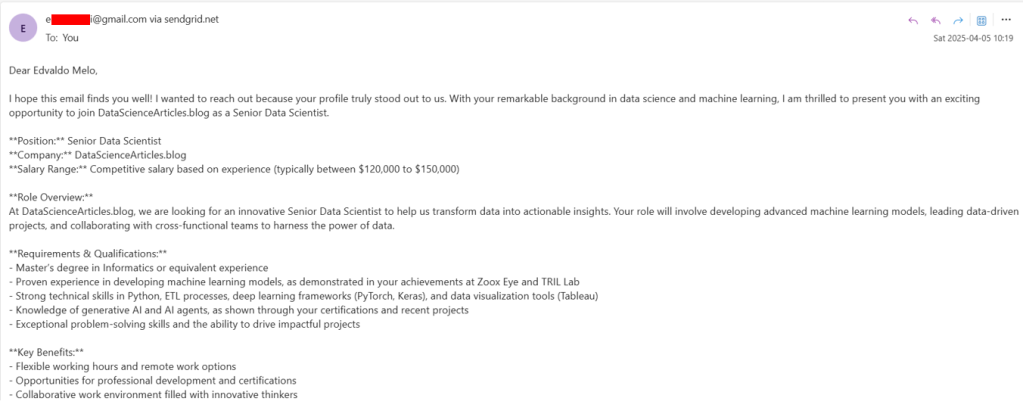
See the full email below (click the arrow to expand).
Dear Edvaldo Melo,
I hope this email finds you well! I wanted to reach out because your profile truly stood out to us. With your remarkable background in data science and machine learning, I am thrilled to present you with an exciting opportunity to join DataScienceArticles.blog as a Senior Data Scientist.
Position: Senior Data Scientist Company: DataScienceArticles.blog Salary Range: Competitive salary based on experience (typically between $120,000 to $150,000)
Role Overview: At DataScienceArticles.blog, we are looking for an innovative Senior Data Scientist to help us transform data into actionable insights. Your role will involve developing advanced machine learning models, leading data-driven projects, and collaborating with cross-functional teams to harness the power of data.
Requirements & Qualifications:
- Master’s degree in Informatics or equivalent experience
- Proven experience in developing machine learning models, as demonstrated in your achievements at Zoox Eye and TRIL Lab
- Strong technical skills in Python, ETL processes, deep learning frameworks (PyTorch, Keras), and data visualization tools (Tableau)
- Knowledge of generative AI and AI agents, as shown through your certifications and recent projects
- Exceptional problem-solving skills and the ability to drive impactful projects
Key Benefits:
- Flexible working hours and remote work options
- Opportunities for professional development and certifications
- Collaborative work environment filled with innovative thinkers
- Contributions to exciting projects that shape the future of data science
The reason for my outreach is simple: we are highly impressed by your experience in machine learning model development, particularly your work with credit scoring and churn prediction. Your expertise in automating data processes and your passion for leveraging AI in real-world applications make you an ideal candidate for this role.
I would love to discuss this opportunity with you further. Please let me know a convenient time for us to chat, or simply reply to this email if you have any questions.
Looking forward to hearing from you soon!
Best regards, Francisco Lead Technical Recruiter DataScienceArticles.blog
See how using Tools makes a Multi AI-Agent system way more powerful and efficient? 🚀
 Edvaldo Melo
Leave a comment