
In this post, I will cover:
- What is a Hierarchical Process?
- Using a Custom Manager Agent
- Adding Planning to the Hierarchical Process
- Using ChatOpenAI as the Hierarchical Manager
To see other posts related to AI Agents with CrewAI, click here — you’ll find details that won’t be covered in this post.
What is a Hierarchical Process?
Beyond the use of Tools, what makes a Multi AI-Agent system truly robust is the collaboration between Agents. The hierarchical process simulates a real-world workflow, in which a Manager Agent can delegate tasks to other team Agents, as well as review the results delivered and suggest improvements when necessary.
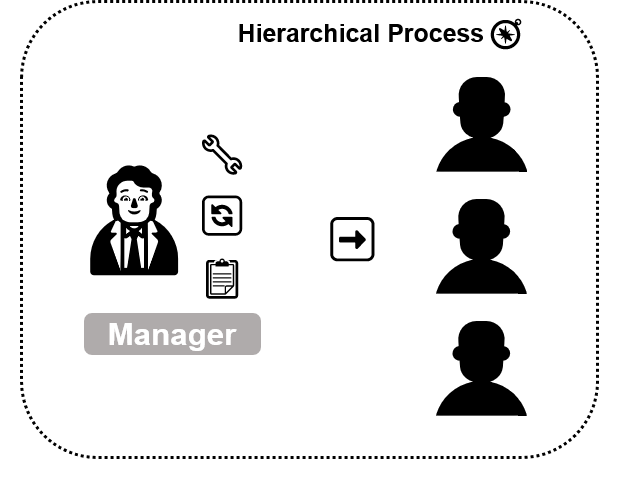
In the sections below, 3 approaches for creating a hierarchical process in CrewAI for the same use case will be presented: creating a Custom Manager, adding Planning to the process, and using ChatOpenAI as the Manager. 👇
Using a Custom Manager Agent
The use case involves identifying the best profiles of people to offer a course. A list of Leads will be sent to the system, and the Agents will be responsible for selecting the most suitable individuals to offer the course, aiming to maximize the chances of sales conversion.
Click the arrow to see all available people profile options 🔽
High school student
University student
Postgraduate student
Technology student
Nursing student
High school teacher
General practitioner
Clinical psychologist
Hospital nurse
Beautician
Personal trainer
Elderly caregiver
Software developer
Software engineer
Front-end developer
IT technician
Data analyst
Clothing salesperson
Sales representative
Sales manager
Digital marketing consultant
Food business owner
Neighborhood retailer
Real estate agent
Executive secretary
Administrative assistant
HR manager
Career coach
Call center operator
App driver
Clinic receptionist
Nanny
Night guard
Waiter
Graphic designer
Freelance photographer
Content producer
Cultural producer
Visual artist
Digital influencer
Freelance manicurist
Beautician
Labor lawyer
Accountant
Civil engineer
Auto mechanic
Wall painter
Rural worker
Chef
Retiree
Artisan
University professor
Master in computer science
Doctor of education
Pedagogical coordinator
Pedagogy intern
Head nurse
Nursing technician
Dental assistant
Physiotherapist
Clinical nutritionist
Biomedical scientist
Full stack developer
Data scientist
Cybersecurity specialist
Software architect
IT support technician
E-commerce manager
Door-to-door salesperson
Sales analyst
Sales supervisor
Marketing assistant
Franchisee
Online store owner
Financial assistant
HR analyst
Project manager
Administrative coordinator
Office assistant
Telemarketing operator
Customer service agent
Doorman
General services assistant
Pharmacy clerk
Barista
Video editor
Copywriter
Screenwriter
Art director
Podcast host
Performing arts student
Hairdresser
Professional makeup artist
Tattoo artist
Public defender
Judge
Tax analyst
Electrical engineer
Professional bricklayer
Residential electrician
Agronomist
Beekeeper
In this approach, 2 Agents were created: the sales representative — responsible for retrieving the list of Leads and selecting the most suitable profiles — and the project manager, who acts as the Manager Agent responsible for ensuring the Task is successfully executed. Below is the YAML file with the definition of both Agents.
senior_salesperson:
  role: >
    Sales Representative
  goal: >
    Identify the leads most likely to be interested in and purchase the course {course}.
  backstory: >
    You are a Sales Representative with over 10 years of experience in identifying
    high-potential leads. Throughout your career, you have developed a strategic eye
    for recognizing behavioral patterns, interests, and professional profiles with a
    higher likelihood of conversion, allowing you to direct your approaches with
    precision and assertiveness.

project_manager:
  role: >
    Project Manager
  goal: >
    Oversee the crew's performance and ensure the selected profiles are highly likely
    to purchase the course {course}. Your goal is to guarantee precision in lead selection
    and maximize conversion potential by delegating improvements when necessary.
  backstory: >
    You are a seasoned Project Manager with a strong background in leading high-performance
    teams and aligning efforts with strategic goals. With a sharp eye for evaluating lead
    quality, your role is to supervise the crew's work, ensuring each selected profile is a
    strong match for the course. When gaps are identified, you delegate actionable improvements
    to optimize results.
Note that one placeholder ({course}) was created, which will be replaced with the offered course during the execution of the process.
Below is the YAML file with the Task definition. Note that only one Task was created, and it was not explicitly assigned to any Agent.
find_leads:
  description: >
    Your mission is to carefully analyze the available options in the {leads} file
    and identify the leads with the highest likelihood of purchasing the course {course}.
    Focus on precision and relevance — only select leads that have a strong match with the
    course content and clear potential to convert.
  expected_output: >
    Return only a bullet point list of the selected leads.
    Do not include any explanation, justification, or additional text.
The {leads} placeholder will be replaced with the file path containing the people profiles.
Below is the crew.py file, which is responsible for building the entire system structure.
from crewai import Agent, Crew, Process, Task
from crewai.project import CrewBase, agent, crew, task
from dotenv import load_dotenv
from crewai_tools import FileReadTool

load_dotenv()


@CrewBase
class HierarchicalModel():

    agents_config = 'config/agents.yaml'
    tasks_config = 'config/tasks.yaml'


    @agent
    def senior_salesperson(self) -> Agent:

        return Agent(
            config=self.agents_config['senior_salesperson'],
            tools=[FileReadTool()],
            llm="gpt-4o-mini",
            allow_delegation=False,
            verbose=True
        )


    @agent
    def project_manager(self) -> Agent:

        return Agent(
            config=self.agents_config['project_manager'],
            llm='gpt-4o',
            allow_delegation=True,
            verbose=True
        )


    @task
    def find_leads(self) -> Task:

        return Task(
            config=self.tasks_config['find_leads'],
            output_file="src/hierarchical_model/leads.md"
        )


    @crew
    def crew(self) -> Crew:

        return Crew(
            agents=[self.senior_salesperson()],
            tasks=[self.find_leads()],
            process=Process.hierarchical,
            manager_agent=self.project_manager(),
            verbose=True
        )
Some key points should be highlighted in the code above:
- I used the
llmparameter to specify the LLM model for each Agent. Note that the Manager Agent has a more robust model than the sales representative. - Another parameter used was
allow_delegation, which allows the Agent to delegate tasks to other Agents or not. For the Manager, this parameter is set toTrue, allowing them to delegate Tasks. - The sales representative Agent can access the Leads list because they have access to the
FileReadTool, which allows reading local files. - When creating the
crewmethod, note that the process parameter was defined ashierarchical. - Finally, it is also necessary to specify which Agent is the Manager, using the
manager_agentparameter.
Finally, here is the main.py file, which actually executes the process.
from crew import HierarchicalModel
from warnings import filterwarnings

filterwarnings("ignore")


def run():

    inputs = {
        "course": "Introduction to Programming",
        "leads": "src/hierarchical_model/leads.txt"
    }

    HierarchicalModel().crew().kickoff(inputs=inputs)


if __name__ == "__main__":
    run()
Note that the course being sold is “Introduction to Programming”, and the file path of the Leads list mentioned above is also provided.
Here is the result generated by the process, that is, the list of the most likely profiles to purchase the course.
- Technology student
- Software developer
- Software engineer
- Front-end developer
- IT technician
- Data analyst
- Full stack developer
- Data scientist
- Cybersecurity specialist
- Software architect
With the verbose=True parameter, it’s possible to follow the Agents’ thought process. You can observe the Manager delegating Tasks to the sales representative. Initially, the Manager asks a question to the representative, using a built-in tool that CrewAI provides for this type of interaction. See the log below.
🚀 Crew: crew
└── 📋 Task: aa56494a-a9f8-4720-a832-4f710cfd9be9
       Status: Executing Task...
    └── 🤖 Agent: Project Manager

            Status: In Progress
        └── 🔧 Using Ask question to coworker (1)
In the following log, you can see the question asked by the Manager to the sales representative.
# Agent: Sales Representative
## Task: Can you provide details on the available leads in the src/hierarchical_model/leads.txt file?
Note that the sales representative uses the provided tool (FileReadTool) to access the available Leads list.
🚀 Crew: crew
└── 📋 Task: aa56494a-a9f8-4720-a832-4f710cfd9be9
       Status: Executing Task...
    ├── 🤖 Agent: Project Manager
    │
    │       Status: In Progress
    │   └── 🔧 Using Ask question to coworker (1)
    └── 🤖 Agent: Sales Representative

            Status: In Progress
        └── 🔧 Used Read a file's content (1)
With the list in hand, the Manager is able to select the best Leads. Below is their thought process.
# Agent: Project Manager
## Using tool: Ask question to coworker
## Tool Input:
"{\"question\": \"Can you provide details on the available leads in the src/hierarchical_model/leads.txt file?\", \"context\": \"I am tasked with identifying leads with the highest likelihood of purchasing the course Introduction to Programming. I need the lead details from the specified file to evaluate relevancy and conversion potential.\", \"coworker\": \"Sales Representative\"}"
Adding Planning to the Hierarchical Process
The difference between this process and the previous one is the addition of the planning parameter in the crew method, inside the crew.py file. Below is the method.
@crew
    def crew(self) -> Crew:

        return Crew(
            agents=[self.senior_salesperson()],
            tasks=[self.find_leads()],
            process=Process.hierarchical,
            manager_agent=self.project_manager(),
            planning=True,
            verbose=True
        )
Here is the result – the list of Leads.
- Software developer
- Software engineer
- Front-end developer
- IT technician
- Data analyst
- Full stack developer
- Data scientist
- Cybersecurity specialist
- Software architect
By analyzing the generated log, you can see that an Agent called Task Execution Planner is created by the crew method, as the planning parameter is being used. This Agent is responsible for planning the execution of Tasks step by step. Below is the log illustrating the created agent.
🚀 Crew: crew
└── 📋 Task: adad6316-9570-4f55-8f52-bcb01d69cbae
       Status: Executing Task...
    └── 🤖 Agent: Task Execution Planner
            Status: In Progress
        └── 🧠 Thinking...
When the Task Execution Planner completes its Task, you can see the plan it created being used in the Manager’s Task.
# Agent: Project Manager
## Task: Your mission is to carefully analyze the available options in the src/hierarchical_model/leads.txt file and identify the leads with the highest likelihood of purchasing the course Introduction to Programming. Focus on precision and relevance — only select leads that have a strong match with the course content and clear potential to convert.
1. Access the file src/hierarchical_model/leads.txt on your system.
2. Open the file using a text editor or a suitable software that can read text files.
3. Read through each lead entry systematically, focusing on their profiles, interests, and any specified qualifications.
4. Identify keywords and phrases that align with 'Introduction to Programming' course content (e.g., programming, coding, computer science, etc.).
5. Create a shortlist of leads that exhibit strong interest or potential in programming or related fields.
6. Evaluate each shortlisted lead for their likelihood of purchasing, based on any provided data points such as previous engagement or inquiries related to programming courses.
7. Compile a bullet point list of only those leads that meet the criteria of high likelihood to purchase the course.
8. Double-check the bullet point list to ensure it is free from errors or irrelevant entries.
9. Prepare to submit this bullet pointed list as the final output, ensuring no explanations or justifications accompany the list.
From there, the Manager can rely on the plan made to generate the best possible results.
Using ChatOpenAI as the Hierarchical Manager
In this version of the hierarchical process, there is no need to create a custom Agent.
- First,
ChatOpenAIwas imported from thelangchain_openailibrary. - Note that only the sales representative Agent was created.
- In the
crewmethod, instead of using themanager_agentparameter, themanager_llmparameter was used, specifyingChatOpenAIwith thegpt-4omodel.
Below is the crew.py file.
from crewai import Agent, Crew, Process, Task
from crewai.project import CrewBase, agent, crew, task
from dotenv import load_dotenv
from crewai_tools import FileReadTool
from langchain_openai import ChatOpenAI

load_dotenv()


@CrewBase
class HierarchicalModel():

    agents_config = 'config/agents.yaml'
    tasks_config = 'config/tasks.yaml'


    @agent
    def senior_salesperson(self) -> Agent:

        return Agent(
            config=self.agents_config['senior_salesperson'],
            tools=[FileReadTool()],
            llm="gpt-4o-mini",
            allow_delegation=False,
            verbose=True
        )


    @task
    def find_leads(self) -> Task:

        return Task(
            config=self.tasks_config['find_leads'],
            output_file="src/hierarchical_model/leads.md"
        )


    @crew
    def crew(self) -> Crew:

        return Crew(
            agents=self.agents,
            tasks=self.tasks,
            process=Process.hierarchical,
            manager_llm=ChatOpenAI(model="gpt-4o"),
            planning=True,
            verbose=True
        )
Below are the results.
- Technology student
- Software developer
- Software engineer
- Front-end developer
- IT technician
- Data analyst
- Full stack developer
- Data scientist
- Cybersecurity specialist
- Software architect
- Master in computer science
Did you see how Agent collaboration can be truly fascinating? When there’s an Agent capable of supervising and optimizing the results, performance becomes even more efficient. It’s impressive how this dynamic can transform processes and achieve outstanding outcomes. 🚀
 Edvaldo Melo
Leave a comment