
FastMCP is a framework that simplifies the creation of servers compatible with the MCP protocol. If you want to learn more about MCP, click here to read my post on the topic.
In this post, I’ll cover:
- Use Case: Automatic Report Sending via Email
- How to Create a Server Using FastMCP
- Server Integration with LangChain
- Server Integration with CrewAI
- Server Integration with Hugging Face
Use Case: Automatic Report Sending via Email
The use case consists of automatically sending an email to the team leader, presenting new tools related to a specific topic and explaining how these tools can contribute to the company’s development.
Below is the adopted flow. First, the agent performs an internet search (using the Serper MCP server) on the topic to either understand it better, if it’s not already familiar, or to gain more context. Then, it drafts an email and sends it to the team leader using the tool built with FastMCP.
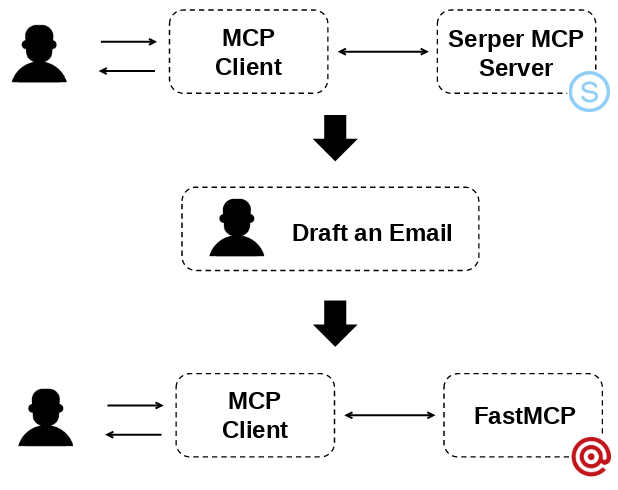
It’s worth noting that the Serper MCP server was created by third parties, and I explain in detail how to use it in the previous post about MCP.
How to Create a Server Using FastMCP
Below is the code for the MCP server created using FastMCP for this use case. The goal is to implement a tool that actually sends an email. For this, Mailgun was used. By signing up on their website, you can obtain an API key with some free credits, as well as a sandbox domain for testing email delivery. In the example from this post, the email will be sent from this sandbox domain to my personal email address.
from fastmcp import FastMCP
import requests
import os
from dotenv import load_dotenv

load_dotenv()


mcp_server = FastMCP("SendEmailMCP")


@mcp_server.tool()
def send_email(to_email: str, subject: str, content: str) -> str:
    """
    Sends an email using the Mailgun API.

    Args:
        to_email (str): Recipient's email address.
        subject (str): Email subject.
        content (str): Plain text body of the email.

    Returns:
        str: Status code of the response if the email is successfully sent, or an error message in case of failure.
    """

    api_key = os.getenv("MAILGUN_API_KEY")
    domain = os.getenv("MAILGUN_DOMAIN")

    try:
        response = requests.post(
            f"https://api.mailgun.net/v3/{domain}/messages",
            auth=("api", api_key),
            data={
                "from": f"Mailgun Sandbox <mailgun@{domain}>",
                "to": [to_email],
                "subject": subject,
                "html": content
            }
        )

        return f"Status Code: {response.status_code}"
    except Exception as e:
        return f"Error sending email: {e}"


if __name__ == "__main__":
    mcp_server.run(transport="sse", host="0.0.0.0", port=4000)
Understanding the code:
mcp_server = FastMCP("SendEmailMCP"): Initializes the MCP server. The name passed as a parameter is used to clearly and conveniently identify the server within the MCP ecosystem, making it easier to distinguish between multiple available servers.@mcp_server.tool(): A required decorator to register a tool.- The function name, in this example,
send_email, is exposed to agents as the tool’s name. - The function’s docstring is used as the tool’s description and will be visible to agents. It’s good practice to describe the expected parameters and return value.
- Finally,
mcp_server.run(transport="sse", host="0.0.0.0", port=4000)sets where the server will run — in this case, at http://localhost:4000.
It’s important to note that, for agents to access the tool, the server must be running. So, run the script in the terminal, for example: python mcp_serper.py. Below is an example of what should appear in the terminal.
Click to expand ⬇️
╭─ FastMCP 2.0 ───────────────────────────────────────────────────────────────────╮
│                                                                                 │
│                                                                                 │
│         _ __ ___ ______           __  __  _____________       ____    ____      │
│        _ __ ___ / ____/___ ______/ /_/  |/  / ____/ __ \     |___ \  / __ \     │
│       _ __ ___ / /_  / __ `/ ___/ __/ /|_/ / /   / /_/ /     ___/ / / / / /     │
│      _ __ ___ / __/ / /_/ (__  ) /_/ /  / / /___/ ____/     /  __/_/ /_/ /      │
│     _ __ ___ /_/    \__,_/____/\__/_/  /_/\____/_/         /_____(_)____/       │
│                                                                                 │
│                                                                                 │
│                                                                                 │
│     🖥️  Server name:     SendEmailMCP                                            │
│     📦 Transport:       SSE                                                     │
│     🔗 Server URL:      http://0.0.0.0:4000/sse/                                │
│                                                                                 │
│     📚 Docs:            https://gofastmcp.com                                   │
│     🚀 Deploy:          https://fastmcp.cloud                                   │
│                                                                                 │
│     🏎️  FastMCP version: 2.10.4                                                  │
│     🤝 MCP version:     1.11.0                                                  │
│                                                                                 │
│                                                                                 │
╰─────────────────────────────────────────────────────────────────────────────────╯


[07/25/25 08:04:41] INFO     Starting MCP server 'SendEmailMCP' with transport 'sse' on http://0.0.0.0:4000/sse/                                                         server.py:1429
INFO:     Started server process [5941]
INFO:     Waiting for application startup.
INFO:     Application startup complete.
INFO:     Uvicorn running on http://0.0.0.0:4000 (Press CTRL+C to quit)
In the next sections, I’ll show how to use this server with LangChain, CrewAI, and Hugging Face. The goal is to demonstrate that the tool can be used regardless of the framework, which, ultimately, is the core purpose of MCP.
Server Integration with LangChain
Below are the Python version used and the contents of the requirements.txt file.
Below is the mcp_client.py file, which connects to the MCP servers for Serper and for email sending created with FastMCP.
from langchain_mcp_adapters.client import MultiServerMCPClient
import os
from dotenv import load_dotenv

load_dotenv()

SMITHERY_KEY = os.getenv("SMITHERY_KEY")
SMITHERY_PROFILE = os.getenv("SMITHERY_PROFILE")


def get_mcp_client():

    client = MultiServerMCPClient({
        "mcp-server-serper": {
            "command": "npx",
            "args": [
                "-y",
                "@smithery/cli@latest",
                "run",
                "@marcopesani/mcp-server-serper",
                "--key",
                SMITHERY_KEY,
                "--profile",
                SMITHERY_PROFILE
            ],
            "transport": "stdio",
        },
        "mcp-server-send-email": {
            "transport": "sse",
            "url": "http://localhost:4000/sse/"
        }
    })


    return client
Note that the Serper server is connected in the same way as explained in my previous post. To connect to the server created with FastMCP, the transport="sse" parameter was used along with the defined URL for that server. It’s important to highlight that you need to append sse/ after the port so the agent can access the available tools.
Below is the report_agent.py file, which is responsible for creating the agent.
from langchain_core.messages import SystemMessage
from langchain_openai import ChatOpenAI
from langgraph.prebuilt import create_react_agent


class ReportAgent:

    def __init__(self, tools):

        self.__tools = tools


    def create_agent(self, boss_name:str, boss_email:str, user_name:str):

        prompt = (
            "You are responsible for sending an informative email to my boss containing a clear and well-researched report on a specified topic.\n\n"
            "Instructions:\n"
            "1. Research the given topic on the internet. Your research should cover:\n"
            "- What the topic is (definition and purpose).\n"
            "- Key points, concepts, or relevant aspects.\n"
            "- Relevant data, updated statistics, or trustworthy studies that support the content.\n"
            "2. Write an email in HTML format, with:\n"
            "- A professional, clear, and objective tone.\n"
            "- A well-organized structure (title, introduction, main topics, and conclusion).\n"
            "- Enough information for the recipient to understand the topic and reflect on potential actions or strategies.\n"
            "3. Finally, send the email using the send_email tool.\n\n"
            "Remember: the goal is to inform and encourage productive discussions about the topic. The content must be reliable, direct, and "
            "relevant for decision-making.\n\n"
            "Informations:\n"
            f"- Boss's name: {boss_name}\n"
            f"- Boss email: {boss_email}\n"
            f"- My name: {user_name}"
        )

        model = ChatOpenAI(model="gpt-4o")

        agent = create_react_agent(
            model=model,
            tools=self.__tools,
            prompt=SystemMessage(content=prompt)
        )

        return agent
Note that you need to pass the leader’s name and email, as well as the user’s name (i.e., the employee), as parameters.
Finally, here is the main.py file, responsible for running the agent with MCP.
import asyncio
from mcp_client import get_mcp_client
from report_agent import ReportAgent
from dotenv import load_dotenv

load_dotenv()


async def main():
    client = get_mcp_client()

    tools = await client.get_tools()

    agent = ReportAgent(tools=tools)

    report_agent = agent.create_agent(
        boss_name="Martin",
        boss_email="e***i@gmail.com",
        user_name="Edvaldo Melo"
    )

    resp = await report_agent.ainvoke({"messages": "The topic is Agent2Agent protocol."})
    print(resp['messages'][-1].content)


if __name__ == "__main__":
    asyncio.run(main())
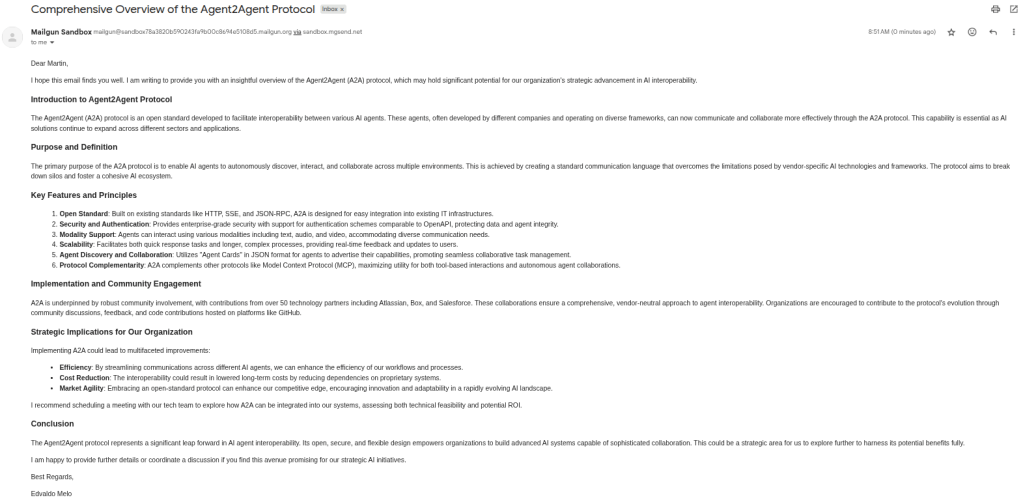
Below is a screenshot showing the actual email being sent from the sandbox (provided by Mailgun) to my personal email, thus simulating the presented use case.
Server Integration with CrewAI
Below is the content of the requirements.txt file. The Python version used is the same as in the LangChain section.
Below is the mcp_client.py file, which connects to the MCP servers for Serper and the one developed using FastMCP.
from mcp import StdioServerParameters
from dotenv import load_dotenv
import os

load_dotenv()

SMITHERY_KEY = os.getenv("SMITHERY_KEY")
SMITHERY_PROFILE = os.getenv("SMITHERY_PROFILE")


def get_mcp_servers():

    mcp_serper = StdioServerParameters(
        command="npx",
        args=[
            "-y",
            "@smithery/cli@latest",
            "run",
            "@marcopesani/mcp-server-serper",
            "--key",
            SMITHERY_KEY,
            "--profile",
            SMITHERY_PROFILE
        ]
    )

    mcp_send_email = {
        "transport": "sse",
        "url": "http://localhost:4000/sse/"
    }

    mcp_servers = [mcp_serper, mcp_send_email]

    return mcp_servers
Note that although the code structure differs from that of LangChain, the connection parameters are the same, which reinforces the standardization that MCP provides.
The report_agent.py file is responsible for creating (but not running) the agent that handles the process. To better understand how CrewAI works, click here to check out a series of posts I’ve written on the topic.
from crewai import Agent, Task, Crew, Process


class ReportAgent:

    def __init__(self, tools):

        self.__tools = tools


    def create_crew(self):

        report_agent = Agent(
            role="Report Agent",
            goal=(
                "Research a given topic thoroughly, synthesize key information into a clear, concise, and well-structured report email, and "
                "send it to the user's boss to inform and support decision-making."
            ),
            backstory=(
                "You are a skilled professional report writer and communicator with expertise in conducting online research, extracting "
                "relevant and trustworthy data, and crafting professional emails in HTML format. You understand the importance of clarity, "
                "objectivity, and relevance when informing leadership to encourage strategic discussions and actions."
            ),
            tools=self.__tools,
            reasoning=True,
            verbose=True
        )

        report = Task(
            description=(
                "User input: {user_input}\n\n"
                "You are responsible for sending an informative email to my boss containing a clear and well-researched report on a specified topic.\n\n"
                "Instructions:\n"
                "1. Research the given topic on the internet. Your research should cover:\n"
                "- What the topic is (definition and purpose).\n"
                "- Key points, concepts, or relevant aspects.\n"
                "- Relevant data, updated statistics, or trustworthy studies that support the content.\n"
                "2. Write an email in HTML format, with:\n"
                "- A professional, clear, and objective tone.\n"
                "- A well-organized structure (title, introduction, main topics, and conclusion).\n"
                "- Enough information for the recipient to understand the topic and reflect on potential actions or strategies.\n"
                "3. Finally, send the email using the send_email tool.\n\n"
                "Remember: the goal is to inform and encourage productive discussions about the topic. The content must be reliable, direct, and "
                "relevant for decision-making.\n\n"
                "Informations:\n"
                "- Boss's name: {boss_name}\n"
                "- Boss email: {boss_email}\n"
                "- My name: {user_name}"
            ),
            expected_output=(
                "A clear, well-structured HTML email report covering the topic's definition, key points, relevant data or studies, written in "
                "a professional and objective tone, enabling informed reflection and decision-making."
            ),
            agent=report_agent
        )

        crew = Crew(
            agents=[report_agent],
            tasks=[report],
            verbose=True,
            process=Process.sequential
        )

        return crew
Similar to the LangChain section, the placeholders {user_input}, {boss_name}, {boss_email}, and {user_name} will be replaced with their corresponding values when running the agent via crew.
Finally, below is the main.py file, which is responsible for running the entire process. It retrieves the tools from the MCP using the MCPServerAdapter provided by CrewAI and then passes them to the agent, who executes everything that was defined for them to do.
from mcp_client import get_mcp_servers
from crewai_tools import MCPServerAdapter
from report_agent import ReportAgent
from dotenv import load_dotenv

load_dotenv()


def main():
    mcp_servers = get_mcp_servers()

    with MCPServerAdapter(mcp_servers) as tools:
        report_agent = ReportAgent(tools)

        crew = report_agent.create_crew()

        results = crew.kickoff(
            inputs={
                "user_input":"The topic is Agent2Agent protocol.",
                "boss_name": "Martin",
                "boss_email": "e***i@gmail.com",
                "user_name": "Edvaldo Melo"
            }
        )

        print(results.raw)


if __name__ == "__main__":
    main()
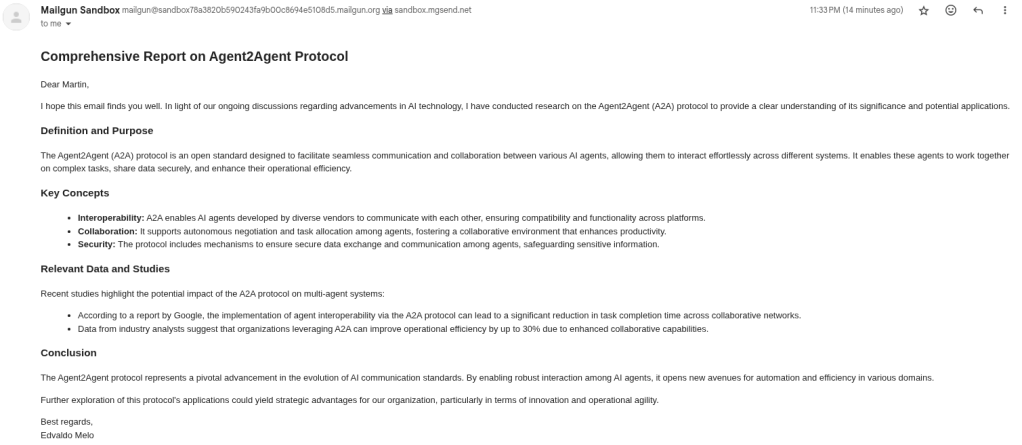
Just like in the LangChain section, below is a screenshot of the actual email sent using CrewAI.
Server Integration with Hugging Face
Below is the content of the requirements.txt file (the Python version is the same).
Below is the mcp_client.py file, which is exactly the same as the one used in the CrewAI integration.
from mcp import StdioServerParameters
from dotenv import load_dotenv
import os

load_dotenv()

SMITHERY_KEY = os.getenv("SMITHERY_KEY")
SMITHERY_PROFILE = os.getenv("SMITHERY_PROFILE")


def get_mcp_servers():

    mcp_serper = StdioServerParameters(
        command="npx",
        args=[
            "-y",
            "@smithery/cli@latest",
            "run",
            "@marcopesani/mcp-server-serper",
            "--key",
            SMITHERY_KEY,
            "--profile",
            SMITHERY_PROFILE
        ]
    )

    mcp_send_email = {
        "transport": "sse",
        "url": "http://localhost:4000/sse/"
    }

    mcp_servers = [mcp_serper, mcp_send_email]

    return mcp_servers
Below is the report_agent.py file. Unlike with LangChain and CrewAI, this file not only creates the agent but also handles its execution.
from smolagents import CodeAgent, OpenAIServerModel


class ReportAgent:

    def __init__(self, tools):

        self.__tools = tools


    def run(self, user_input:str, boss_name:str, boss_email:str, user_name:str):

        prompt = (
            "You are responsible for sending an informative email to my boss containing a clear and well-researched report on a specified topic.\n\n"
            "Instructions:\n"
            "1. Research the given topic on the internet. Your research should cover:\n"
            "- What the topic is (definition and purpose).\n"
            "- Key points, concepts, or relevant aspects.\n"
            "- Relevant data, updated statistics, or trustworthy studies that support the content.\n"
            "2. Write an email in HTML format, with:\n"
            "- A professional, clear, and objective tone.\n"
            "- A well-organized structure (title, introduction, main topics, and conclusion).\n"
            "- Enough information for the recipient to understand the topic and reflect on potential actions or strategies.\n"
            "3. Finally, send the email using the send_email tool.\n\n"
            "Remember: the goal is to inform and encourage productive discussions about the topic. The content must be reliable, direct, and "
            "relevant for decision-making."
        )

        model = OpenAIServerModel(
            model_id="gpt-4o",
            temperature=0.1
        )

        agent = CodeAgent(
            model=model,
            max_steps=10,
            tools=self.__tools,
            verbosity_level=2
        )

        result = agent.run(
            task=prompt,
            additional_args={
                "user_input": user_input,
                "boss_name": boss_name,
                "boss_email": boss_email,
                "user_name": user_name
            }
        )

        return result
In a future post, I’ll cover smolagents in more detail. These are CodeAgents, meaning they perform their tasks directly through Python code. If you’re curious, click here to access the official documentation.
Finally, here is the main.py file, which is responsible for running the entire process. Note that smolagents provides the ToolCollection class, which includes the from_mcp method to handle the MCP protocol.
import asyncio
from mcp_client import get_mcp_servers
from smolagents import ToolCollection
from report_agent import ReportAgent
from dotenv import load_dotenv

load_dotenv()


async def main():
    mcp_servers = get_mcp_servers()

    with ToolCollection.from_mcp(mcp_servers, trust_remote_code=True) as tool_collection:
        tools = [*tool_collection.tools]

        report_agent = ReportAgent(tools)

        result = report_agent.run(
            user_input="What is the Agent2Agent protocol?",
            boss_name="Martin",
            boss_email="e***i@gmail.com",
            user_name="Edvaldo Melo"
        )
        print(result)


if __name__ == "__main__":
    asyncio.run(main())
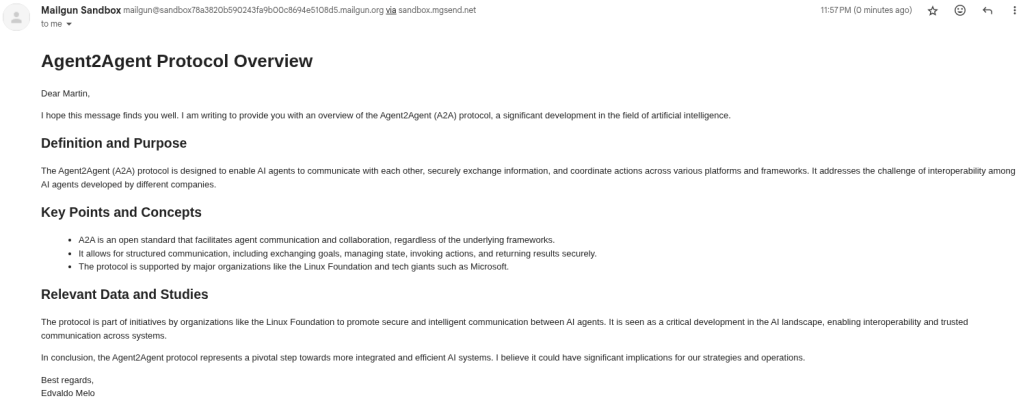
Just like with the other frameworks, below is a screenshot of the actual email being sent.
 Edvaldo Melo
Leave a comment