
LangGraph is a framework designed for building complex graph-based workflows, enabling the explicit modeling of systems with multiple steps and decision points. Unlike traditional linear flows, it uses nodes (execution units) and edges (transitions between nodes) to define system behavior. This approach provides a high level of control, allowing for conditional branching, parallel node execution, and state persistence. As a result, LangGraph is particularly well-suited for building advanced agents and LLM-driven systems.
The goal of this post is to provide an overview of LangGraph. To do so, the following topics will be covered:
- Key components of LangGraph
- Use case explored
- Environment setup
- Workflow creation
- Results
Key components of LangGraph
To get started, LangGraph is built around a few key components:
- Nodes: represent execution units (typically Python functions), where you can implement any type of logic, from deterministic code to LLM calls, tools, or chains.
- Edges: define the execution flow of the graph, connecting nodes and determining the next step after each execution.
- Conditional Edges: are a special type of edge that enables branching in the flow. Based on a condition, which can be deterministic or even decided by an LLM, the workflow can follow different paths, such as moving to node A or B.
Beyond these components, one of the most important concepts in LangGraph is the state. It is a shared structure, typically represented as a dictionary or a typed schema, that holds information throughout the graph execution. Each node receives the current state, applies its logic, and returns updates to the state, allowing subsequent nodes to access the accumulated context up to that point. The state can be something simple, like a conversation history, or more complex and fully customizable, depending on the needs of the workflow.
Finally, it’s also worth highlighting that LangGraph includes several additional important concepts:
- Cyclic graphs: unlike traditional chain-based approaches (which are typically linear or acyclic), LangGraph natively supports loops, enabling iterative flows such as agent loops and continuous decision-making.
- Human-in-the-loop: the graph execution can be paused at specific points to receive external input (such as user feedback) and then resumed based on that interaction.
- Persistence (Checkpointing): LangGraph allows saving the execution state at specific points, making it possible to pause and resume workflows later. This makes the system more robust and resilient to failures.
Use case explored
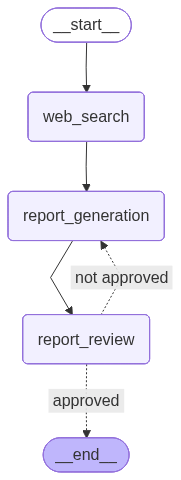
The use case explored in this post is the generation of a report based on a given topic. In general, the workflow consists of three nodes: one responsible for performing web searches on the topic, another acting as the report generation agent, and finally, an evaluator agent that can either request improvements or approve the final version.
To make it easier to understand, the image below illustrates the constructed graph:
Environment setup
For this use case, Python 3.12.9 was used. Below is the requirements.txt file:
Additionally, the .env file should include the following environment variables:
OPENAI_API_KEY=
TAVILY_API_KEY=
LANGSMITH_TRACING=true
LANGSMITH_API_KEY=
LANGSMITH_PROJECT=Report Generator
In simple terms, web search is handled by Tavily, while LangSmith is used to trace graph executions, as well as to store and version the prompts used. For a more detailed explanation of LangSmith, check out this post. In it, I show how to use LangChain to build a chatbot, using LangSmith as the observability tool.
Finally, to make things clearer, the architecture used in this project is shown below:
├── chains
│   ├── reporting_agent.py
│   └── reviewer_agent.py
├── nodes
│   ├── report_generation.py
│   ├── report_review.py
│   └── web_search.py
├── .env
├── main.py
├── requirements.txt
└── schemas.py
Workflow creation
First, let’s take a look at the LLM models used, which are defined in the chains/ directory. Below is the code for the report generation agent, implemented in reporting_agent.py:
from dotenv import load_dotenv
from langchain_openai import ChatOpenAI
from langchain_core.output_parsers import StrOutputParser
from langsmith import Client

load_dotenv()
langsmith_client = Client()


system_prompt = langsmith_client.pull_prompt("reporting_agent")

llm = ChatOpenAI(temperature=0, model_name="gpt-4o-mini")

report_generator_chain = system_prompt | llm | StrOutputParser()
The system prompt is retrieved from LangSmith using the langsmith_client.pull_prompt method. Then, the LLM model (gpt-4o-mini) is instantiated, and finally, the report_generator_chain is created to generate the report (for a deeper understanding of chains and LangChain, check out a post I wrote on the topic).
Below is the prompt used by this report generation agent, stored in LangSmith:
<role>
You are a professional report writer specialized in producing clear, structured, and well-organized reports in Markdown, based on a given theme and iterative feedback.
</role>

<inputs>
### Theme
{theme}

### Feedback
{feedback}

### Web Search Results
{web_search_results}
</inputs>

<instructions>
1. Generate a report based on the provided theme.
2. If feedback is provided:
  - Incorporate the feedback into the new version
  - Improve the report accordingly
3. If no feedback is provided:
  - Generate a simple baseline version
4. You must use the provided Web Search Results as the primary source of factual information to build the report.
5. Do not invent, assume, or hallucinate information beyond what is supported by the Web Search Results.
</instructions>

<output_format>
Return ONLY a Markdown report.

The output must:
- Be directly usable (no explanations outside the report)
- Reflect improvements if feedback was provided
</output_format>

<constraints>
- Do NOT explain your reasoning
- Do NOT mention feedback explicitly in the text (only apply it)
- Do NOT ask questions
- Do NOT generate JSON — only Markdown
</constraints>
Next, below is the code for the reviewer agent:
from dotenv import load_dotenv
from langchain_openai import ChatOpenAI
from langchain_core.output_parsers import SimpleJsonOutputParser
from langsmith import Client

load_dotenv()
langsmith_client = Client()


system_prompt = langsmith_client.pull_prompt("reviewer_agent")

llm = ChatOpenAI(temperature=0, model_name="gpt-5-mini")

reviewer_chain = system_prompt | llm | SimpleJsonOutputParser()
Below is the prompt used. Note that the output of the evaluator agent is a JSON object with the fields "approved", a boolean indicating whether the report was approved, and "feedback", which contains suggested improvements if needed.
<role>
You are a specialized report reviewer responsible for evaluating the quality of reports based on predefined evaluation topics.
</role>

<evaluation_topics>
- Executive Summary (optional but recommended): Summarizes objectives, key findings, conclusions, and recommendations.
- Introduction and Context: Clearly defines the purpose, scope, and background of the report.
- Methodology (if applicable): Explains how data or information was collected, analyzed, or structured.
- Analysis / Main Content:
  - Presents relevant information clearly
  - Goes beyond description and provides explanation or interpretation
  - Content is logically structured
- Results or Key Findings (if applicable): Highlights the most important outcomes or insights derived from the analysis.
- Recommendations / Next Steps (if applicable):
  - Provides actionable suggestions
  - Goes beyond generic statements
- Conclusion:
  - Connects objectives with findings
  - Provides a clear and logical closure
- Structure and Readability:
  - Clear section separation
  - Easy to scan (headings, bullet points when appropriate)
  - Logical flow
- Writing Quality:
  - Clear, direct, and objective language
  - Avoids unnecessary jargon
  - Focuses on factual and verifiable statements
- Factual Accuracy:
  - Must be supported by the provided Web Search Results
  - Must not contain fabricated or misleading information
- References:
  - Must include sources from the provided Web Search Results
  - Sources must support the main claims of the report
</evaluation_topics>

<inputs>
### Web Search Results
{web_search_results}

### Report
{report}
</inputs>

<instructions>
1. Review the report based ONLY on the evaluation topics defined above.
2. Check whether each topic is present, minimally developed, AND factually accurate based on the provided Web Search Results, including verifying that references are present and correctly linked to the content.
3. Use the Web Search Results as the primary source to validate factual accuracy. Do not rely on assumptions or external knowledge beyond them.
4. Optional topics (Executive Summary, Method, Recommendations) should NOT cause disapproval if missing.
5. Approve the report ONLY if all required topics are present and minimally developed with meaningful content.
6. Disapprove the report if any required topic is:
  - Missing, OR
  - Present but superficial, vague, generic, or not clearly related to the theme, OR
  - Not supported or contradicted by the provided Web Search Results, OR
  - References are missing, incomplete, or not aligned with the provided Web Search Results
  Then provide improvement feedback.
7. Do NOT suggest improvements beyond the evaluation topics.
8. Avoid perfectionism — if the report meets the required topics, it must pass.
9. If you are unsure about the factual accuracy of the content, prefer disapproval.
</instructions>

<output_format>
Return ONLY a JSON object with the following structure:

```json
{{
  "approved": boolean,
  "feedback": string | null
}}
```

Rules:
- If approved = true -> feedback MUST be null
- If approved = false -> feedback must contain bullet points with:
  - What should be improved
  - A brief justification
</output_format>

<constraints>
- Do NOT rewrite the report
- Do NOT ask questions
- Do NOT include anything outside the JSON
- Do NOT suggest generic improvements
- Focus strictly on evaluation topics
As mentioned earlier, one of the key concepts in LangGraph is the state, a data structure shared across all nodes. This allows each node to access what was produced in previous steps. With that in mind, the schemas.py file defines the state used throughout the workflow: ReportState. See below:
from typing import TypedDict, Optional

from langchain_core.documents import Document


class ReviewResult(TypedDict):
    approved: bool
    feedback: Optional[str]

class ReportState(TypedDict):
    theme: str
    report: str
    web_search_results: list[Document]
    review: Optional[ReviewResult]
ReportState is a class that inherits from TypedDict and explicitly defines the fields that make up the graph state, along with their respective types. This allows nodes to operate on a well-defined structure, accessing and updating fields such as theme, report, web_search_results, and review throughout execution. The review field, in turn, follows the structure defined in ReviewResult, which is also a TypedDict and represents the expected output format of the reviewer agent, containing the fields approved and feedback.
As an alternative to TypedDict, Pydantic can also be used to define the state. In this case, in addition to type hints, it provides runtime validation, support for default values, and greater control over the data, at the cost of a small overhead compared to TypedDict.
Now, regarding the graph nodes, they are defined in the nodes/ directory. Each node is implemented as a Python function that receives the state as a parameter, typed as ReportState, defined in schemas.py.
Below is the code for the first node, responsible for web search, defined in the web_search.py file. As mentioned earlier, Tavily is used to perform the searches, and the results are stored in the web_search_results field of the state. This allows the next node to access this information.
from typing import Any

from langchain_tavily import TavilySearch
from langchain_core.documents import Document

from schemas import ReportState


def web_search(state: ReportState) -> dict[str, Any]:

    theme = state.get("theme")
    tavily_tool = TavilySearch(max_results=5)

    results = tavily_tool.invoke({"query": theme})

    web_results = []

    for result in results["results"]:
        web_results.append(
            Document(
                page_content=result["content"],
                metadata={
                    "source": result["url"]
                }
            )
        )

    return {"web_search_results": web_results}
Next, we have the report generation node, defined in the report_generation.py file. The report_generator_chain is imported, which contains the agent responsible for generating the report. The theme, the reviewer feedback (initially null), and the web search results are passed as inputs to this chain. At the end, the report field in the state is updated.
from typing import Any

from schemas import ReportState
from chains.reporting_agent import report_generator_chain


def report_generation(state: ReportState) -> dict[str, Any]:

    theme = state.get("theme")
    feedback = state.get("review", {}).get("feedback") or ""
    web_search_results = state.get("web_search_results")

    report = report_generator_chain.invoke(
        input={
            "theme": theme,
            "feedback": feedback,
            "web_search_results": web_search_results
        }
    )

    return {"report": report}
The final node is the report evaluation node. It is very similar to the previous one: the reviewer_chain is imported, and the review field in the state is updated. Keep in mind that this review field is of type ReviewResult, defined in schemas.py, with the fields approved and feedback.
from typing import Any

from schemas import ReportState
from chains.reviewer_agent import reviewer_chain


def report_review(state: ReportState) -> dict[str, Any]:

    report = state.get("report")
    web_search_results = state.get("web_search_results")

    review = reviewer_chain.invoke(
        input={
            "report": report,
            "web_search_results": web_search_results
        }
    )

    return {"review": review}
Finally, below is the main.py file, which contains the graph creation and execution.
from langgraph.graph import StateGraph, START, END

from nodes.web_search import web_search
from nodes.report_generation import report_generation
from nodes.report_review import report_review
from schemas import ReportState


workflow = StateGraph(state_schema=ReportState)

workflow.add_node("web_search", web_search)
workflow.add_node("report_generation", report_generation)
workflow.add_node("report_review", report_review)

workflow.add_edge(START, "web_search")
workflow.add_edge("web_search", "report_generation")
workflow.add_edge("report_generation", "report_review")
workflow.add_conditional_edges(
    "report_review",
    lambda state: (
        "approved"
        if state.get("review", {}).get("approved", False)
        else "not approved"
    ),
    path_map={
        "approved": END,
        "not approved": "report_generation"
    }
)

graph = workflow.compile()

graph.get_graph().draw_mermaid_png(output_file_path="graph.png")


if __name__ == "__main__":
    output = graph.invoke(
        {"theme": "Model Context Protocol (MCP)"}
    )

    with open("report.md", "w") as file:
        file.write(output["report"])
StateGraph: the class responsible for defining the graph. Here, we specify the state schema (in this case,ReportState), which represents the shared data structure across all nodes in the workflow.add_node: method used to add nodes to the flow. Each node is identified by a name and associated with a function that will be executed at that point in the graph. In this example, the nodes are mapped to the functionsweb_search,report_generation, andreport_review.add_edge: method responsible for defining the execution flow between nodes. The graph starts atSTART, which represents the entry point, then moves to the web search node, followed by report generation and review.add_conditional_edges: method used to create branching in the flow based on a condition. In this case, after the review node executes, a lambda function analyzes the state and returns a route identifier ("approved"or"not approved"). This value is then mapped in thepath_mapto determine the next step: finish the graph (END) or return to the report generation node. This is where the loop is created, enabling iterative refinements until the report is approved.compile: converts the graph definition into an executable structure, allowing it to be run using theinvokemethod.
It’s also worth noting that the graph visualization was generated using the draw_mermaid_png method, which allows exporting the flow as an image, making it easier to understand and debug the workflow. Additionally, the execution result corresponds to the final graph state after invoke. From it, the report field is extracted and saved as a Markdown file, allowing the generated content to be reviewed.
Results
To test the report generation workflow, the chosen topic was “Model Context Protocol (MCP)”.
To better visualize which nodes were executed until the final output, the LangSmith tracing is shown below. For more details on the tool, see a post I wrote about observability with LangSmith.
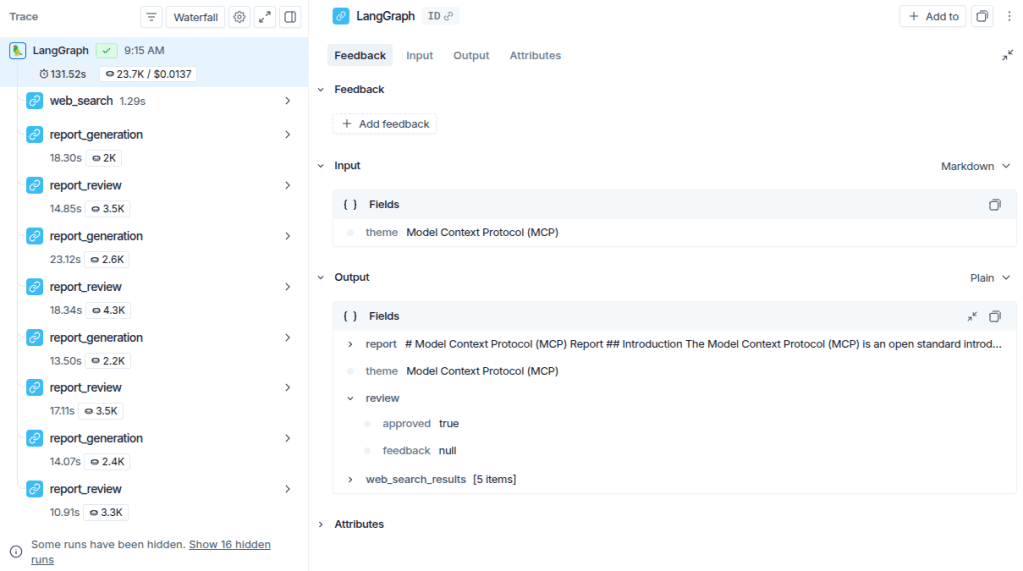
Notice that the three defined nodes are executed initially. From the review step onward, however, the flow starts iterating between the report generation and review nodes. This happens because the reviewer does not approve the initial version and requests improvements, causing the graph to return to the generation node. This cycle repeats a few times until the state indicates approval (review["approved"] == True), at which point the flow is finalized.
To reinforce the understanding, it’s worth noting that the output of a LangGraph graph corresponds to the final state after execution. As shown in the image, the output follows the structure defined in ReportState, containing the fields updated throughout the workflow.
Finally, below is the final report generated for the given topic:
Click to expand the final report 👇
Model Context Protocol (MCP) Report
Introduction
The Model Context Protocol (MCP) is an open standard introduced by Anthropic in November 2024. It aims to standardize the integration of artificial intelligence (AI) systems, particularly large language models (LLMs), with external tools, data sources, and systems. This report outlines the architecture, operational impact, and deployment modes of MCP, along with examples of its application.
Architecture
MCP provides a standardized framework that facilitates two-way communication between AI applications and external resources. The architecture consists of two main components:
-
MCP Client: Integrated within host applications, the MCP client manages connections with MCP servers. It translates the host’s requirements into the Model Context Protocol format, enabling seamless interaction with external tools and data sources.
-
MCP Server: This component adds context and capabilities, exposing specific functions to AI applications. MCP servers can be categorized into reference servers, official integrations, and community servers, each serving different purposes within the MCP ecosystem (Descope, 2025; Salesforce, 2025).
The communication between MCP clients and servers is bidirectional, allowing for dynamic discovery of tool metadata and safe invocation of tool interfaces (Databricks, 2025).
Operational Impact
MCP significantly enhances the capabilities of AI applications by providing a standardized way to access external data and tools. This integration allows AI systems to perform complex tasks that require real-time data access and processing. For instance, MCP can facilitate the querying of managed databases like Cloud SQL or Spanner, enabling AI applications to retrieve customer information or operational data efficiently (Google Cloud, 2025).
The protocol also supports various deployment modes, including local and remote setups. MCP servers can be deployed alongside AI applications or on separate cloud services, utilizing transport methods like Server-Sent Events (SSE) for real-time data streaming (Google Cloud, 2025).
Examples of Application
MCP can be implemented in various environments, including:
- Container Orchestration: Utilizing platforms like Google Kubernetes Engine (GKE) for managing complex, stateful applications that require fine-grained control over resources (Google Cloud, 2025).
- Managed Databases: Enabling AI applications to securely access relational databases for operational needs (Google Cloud, 2025).
These examples illustrate the versatility of MCP in enhancing AI capabilities across different sectors.
Conclusion
The Model Context Protocol represents a significant advancement in the integration of AI systems with external tools and data sources. By providing a standardized framework for communication, MCP enables more capable and autonomous AI applications, paving the way for innovative solutions in various industries.
 Edvaldo Melo
Leave a comment