
Multimodal embedding models are designed to process and relate information from different data types, such as text, images, audio, and video. The main goal is to create vector representations, generally in a shared space, allowing semantically related information to be represented close to each other, regardless of their original modality.
This ability to relate information across different modalities expands the possibilities of embedding-based applications, enabling, for example, the association of visual content with textual descriptions. These representations can be used directly in cross-modal semantic search systems, as well as components of more complex architectures, such as automatic image captioning and visual question answering systems.
The goal of this post is to use the clip-ViT-B-32 embedding model to perform vector similarity searches on a fashion product dataset, using images or textual descriptions as input. Considering a product recommendation application, for example, users will be able to upload a reference image or describe the characteristics of the desired product, and the system will retrieve the most similar products to the query using vector representations.
This post will cover:
- Environment Setup
- Dataset Overview and Preprocessing
- Milvus Vector Database Setup
- Embedding Generation and Data Ingestion
- Testing and Results Analysis
Environment Setup
To simplify the environment setup, environment variables will not be used in this post. The Python dependencies required to run the examples are listed in the requirements.txt file, shown below:
Dataset Overview and Preprocessing
The dataset used in this post contains fashion products from an e-commerce platform and is available on kaggle. It includes over 40,000 records, containing product images and their associated metadata. The directory and file structure after downloading the dataset is shown below:
fashion-dataset/
├── fashion-dataset/
├── images/
├── styles/
├── images.csv
└── styles.csv
Each product has a unique identifier (ID), which is used to associate its images with the corresponding metadata. In the images/ and styles/ directories, files are named according to the product ID, such as images/1163.jpg and styles/1163.json. The JSON files contain additional information, such as product name, description, price, age group, and gender.
This variety of information makes the dataset suitable for different applications, ranging from image classification tasks to product retrieval and recommendation systems based on semantic similarity. Additionally, more complex architectures can be explored, such as RAG systems with metadata-based pre-filtering, combining relevant product retrieval with the generation of contextualized responses.
The code used to preprocess the dataset is shown below:
import jsonfrom pathlib import Pathfrom markdownify import markdownifyfrom pandas import DataFrameDATA_DIR = Path("fashion-dataset/styles")def process_products(): products = [] for file_path in DATA_DIR.glob("*.json"): with file_path.open("r", encoding="utf-8") as file: product = json.load(file)["data"] description = ( product.get("productDescriptors", {}) .get("description", {}) .get("value") ) image_url = ( product.get("styleImages", {}) .get("default", {}) .get("imageURL") ) products.append({ "id": product["id"], "product_name": product["productDisplayName"], "description": ( markdownify(description, heading_style="ATX") if description else "Description not available" ), "image_url": image_url if image_url else "Image not available" }) return productsif __name__ == "__main__": products = process_products() df = DataFrame(products) df = df.drop_duplicates(subset=["product_name"]) df = df.drop_duplicates(subset=["image_url"]).reset_index(drop=True) df.to_parquet("products.parquet")
First, the path to the product metadata files is defined in the DATA_DIR constant.
Next, the process_products() function is responsible for extracting the required information from each product. To do this, it iterates through the JSON files and returns a list containing the product IDs, names, descriptions, and image URLs. During this process, the descriptions are converted from HTML to markdown using the markdownify library.
Using the returned list, a DataFrame is created, and duplicate records are removed, first based on the product name and then on the image URL. Since the goal of this post is to explore multimodal embeddings through similarity searches, this step aims to reduce redundancy among the products to be indexed, keeping only one record for repeated product names or image URLs, even when other attributes differ. Finally, the processed dataset is saved to the products.parquet file.
Milvus Vector Database Setup
Milvus is an open-source, cloud-native, high-performance vector database designed to store, index, and perform similarity searches across large collections of vectors.
In this project, Milvus will run locally using Docker. To achieve this, a docker-compose.yml file was created to define and configure the services, networks, and volumes required to run it.
services: etcd: container_name: milvus-etcd image: quay.io/coreos/etcd:v3.5.5 environment: - ETCD_AUTO_COMPACTION_MODE=revision - ETCD_AUTO_COMPACTION_RETENTION=1000 - ETCD_QUOTA_BACKEND_BYTES=4294967296 - ETCD_SNAPSHOT_COUNT=50000 volumes: - ${DOCKER_VOLUME_DIRECTORY:-.}/volumes/etcd:/etcd command: etcd -advertise-client-urls=http://127.0.0.1:2379 -listen-client-urls http://0.0.0.0:2379 --data-dir /etcd healthcheck: test: ["CMD", "etcdctl", "endpoint", "health"] interval: 30s timeout: 20s retries: 3 minio: container_name: milvus-minio image: milvusdb/minio:RELEASE.2024-12-18T13-15-44Z environment: MINIO_ACCESS_KEY: minioadmin MINIO_SECRET_KEY: minioadmin ports: - "9001:9001" - "9000:9000" volumes: - ${DOCKER_VOLUME_DIRECTORY:-.}/volumes/minio:/minio_data command: minio server /minio_data --console-address ":9001" healthcheck: test: ["CMD", "curl", "-f", "http://localhost:9000/minio/health/live"] interval: 30s timeout: 20s retries: 3 standalone: container_name: milvus-standalone image: milvusdb/milvus:v2.3.0 command: ["milvus", "run", "standalone"] environment: ETCD_ENDPOINTS: etcd:2379 MINIO_ADDRESS: minio:9000 volumes: - ${DOCKER_VOLUME_DIRECTORY:-.}/volumes/milvus:/var/lib/milvus healthcheck: test: ["CMD", "curl", "-f", "http://localhost:9091/healthz"] interval: 30s start_period: 90s timeout: 20s retries: 3 ports: - "19530:19530" - "9091:9091" depends_on: - "etcd" - "minio"networks: default: name: milvus
This configuration uses three services:
- etcd: responsible for storing internal metadata and control information used by Milvus, such as collection schemas, internal identifiers, and operation states. It also helps coordinate the system components. For example, when creating a collection named
documentswith the fieldsid,embedding, andauthor, etcd stores metadata about the collection, including its schema and internal identifier, allowing Milvus components to identify and manage it. - minio: an object storage service compatible with the Amazon S3 API, responsible for the persistent storage of Milvus data, including vector data segments, metadata associated with records, and index files.
- standalone: the main Milvus service, responsible for operations such as collection creation, data insertion, index building, and vector searches. In this deployment mode, the main internal Milvus components run within a single instance.
Since Docker and Docker Compose are not the focus of this post, the configuration file will not be explored in further detail. However, I plan to cover these topics in a future post. Additionally, it is worth noting that a specific version of Milvus was used, even though newer versions are available. Since the goal here is not to dive deeper into concepts related to vector databases or Milvus itself, I chose to keep the version used during development and testing. Still, feel free to experiment with newer versions, keeping in mind that adjustments to the configuration and dependencies may be necessary.
Finally, to start the Milvus services, Docker must be installed on your machine. Then, simply navigate to the directory containing the docker-compose.yml file and run the following command in the terminal:
docker compose up -d
Embedding Generation and Data Ingestion
With the dataset already preprocessed, we can now begin ingesting products into the Milvus vector database. To do this, the strategy adopted in this post consists of transforming product images into high-dimensional vector representations, associating each embedding with a set of metadata, such as the product ID, name, description, image URL, and image path. This way, when performing similarity searches, we can retrieve the most relevant products along with their associated metadata. If you are not yet familiar with these concepts, I recommend reading my previous posts on embeddings and RAG.
To transform images into vector representations, the clip-ViT-B-32 embedding model, originally developed by OpenAI, will be used. This model enables text and images to be mapped into a shared vector space, where semantically related representations tend to be close to each other, regardless of their original modality.
The code used to ingest the data is shown below:
import osos.environ["USE_TF"] = "0"os.environ["TF_CPP_MIN_LOG_LEVEL"] = "3"from pathlib import Pathfrom pandas import read_parquetfrom PIL import Imagefrom pymilvus import MilvusClient, DataTypefrom sentence_transformers import SentenceTransformerfrom tqdm.auto import tqdmCOLLECTION_NAME = "products_catalog"EMBEDDING_DIM = 512BATCH_SIZE = 32DATASET_PATH = "products.parquet"IMAGES_DIR = Path("fashion-dataset/images")def create_collection(client): if client.has_collection(COLLECTION_NAME): client.drop_collection(COLLECTION_NAME) schema = MilvusClient.create_schema( auto_id=True, enable_dynamic_field=False, description="Fashion Product Catalog" ) schema.add_field("id", DataType.INT64, is_primary=True) schema.add_field("product_id", DataType.INT64) schema.add_field("product_name", DataType.VARCHAR, max_length=200) schema.add_field("description", DataType.VARCHAR, max_length=5000) schema.add_field("image_url", DataType.VARCHAR, max_length=500) schema.add_field("image_path", DataType.VARCHAR, max_length=500) schema.add_field("embedding", DataType.FLOAT_VECTOR, dim=EMBEDDING_DIM) index_params = client.prepare_index_params() index_params.add_index( field_name="embedding", index_type="HNSW", metric_type="COSINE", params={ "M": 16, "efConstruction": 100 } ) client.create_collection( collection_name=COLLECTION_NAME, schema=schema, index_params=index_params )def insert_products(client): df = read_parquet(DATASET_PATH) df = df[df["description"].str.encode("utf-8").str.len() <= 5000] embedding_model = SentenceTransformer("sentence-transformers/clip-ViT-B-32") embedding_model.eval() inserted_count = 0 print(f"Starting ingestion of {df.shape[0]} products...") for batch_start in tqdm( range(0, df.shape[0], BATCH_SIZE), desc="Processing batches" ): products = df.iloc[batch_start:batch_start + BATCH_SIZE] images = [] valid_products = [] for _, product in products.iterrows(): image_path = IMAGES_DIR / f"{product['id']}.jpg" try: with Image.open(image_path) as image: images.append(image.convert("RGB")) valid_products.append(product) except FileNotFoundError: continue if not images: continue image_embeddings = embedding_model.encode( images, batch_size=BATCH_SIZE, show_progress_bar=False ) batch = [] for i, product in enumerate(valid_products): batch.append({ "product_id": int(product["id"]), "product_name": product["product_name"], "description": product["description"], "image_url": product["image_url"], "image_path": str(IMAGES_DIR / f"{product['id']}.jpg"), "embedding": image_embeddings[i].tolist() }) client.insert( collection_name=COLLECTION_NAME, data=batch ) inserted_count += len(batch) print(f"Successfully inserted {inserted_count} embeddings.")if __name__ == "__main__": client = MilvusClient(uri="http://localhost:19530") create_collection(client) insert_products(client)
First, several constants were defined:
COLLECTION_NAME: the name of the collection to be created in Milvus, in this case,products_catalog.EMBEDDING_DIM: the dimensionality of the vectors generated by theclip-ViT-B-32embedding model. In this case, each image will be represented by a 512-dimensional vector.BATCH_SIZE: the maximum number of images processed per batch for embedding generation and subsequent insertion into Milvus, along with their associated metadata.DATASET_PATH: the path to the preprocessed dataset saved in parquet format.IMAGES_DIR: the directory containing the product catalog images.
Next, two functions were created:
create_collection: responsible for creating the collection in Milvus, including defining its schema, fields, and indexing parameters. Initially, if the collection already exists, it is dropped to allow it to be recreated. This approach was adopted for simplicity, considering the experimental nature of this post. The schema is then defined using thecreate_schema()method ofMilvusClient, with an automatically generated primary key and the fieldsproduct_id,product_name,description,image_url,image_path, andembedding. The latter stores the vector representation of each image generated by the embedding model. Next, the indexing parameters are configured inindex_params, using the HNSW algorithm to build the vector index and the cosine metric to compare vectors. To better understand how HNSW works, I recommend reading my post about this algorithm. Finally, the collection is created using thecreate_collection()method.insert_products: responsible for ingesting data into Milvus. Initially, the dataset is loaded into a DataFrame, and records with descriptions exceeding 5,000 bytes in UTF-8 are removed. Next, the embedding model is loaded, and the products are processed in batches according to the value defined inBATCH_SIZE. For each batch, images are loaded individually, skipping those that cannot be found in the directory. The valid images are then transformed into vector representations usingembedding_model.encode(). Finally, the embeddings are associated with their corresponding metadata, and the records are inserted into Milvus using theclient.insert()method.
After running the script, 31,118 products were inserted into the Milvus collection. This number represents the remaining records after the dataset preprocessing steps described earlier, the description size filtering, and the exclusion of products whose images could not be found.
Testing and Results Analysis
With the data already stored in Milvus, we can perform similarity searches to retrieve the most relevant products based on an input query. To demonstrate this, two tests will be conducted: in the first, an image will be used as input to retrieve the most similar images from the catalog, along with their associated metadata. In the second, a textual product description will be used as input to retrieve images semantically related to the text. These tests demonstrate one of the main advantages of multimodal embeddings: the ability to perform searches using different modalities, such as images and text, facilitating product discovery and providing users with different ways to find what they are looking for.
The code used to perform the previously described tests is shown below:
import argparsefrom PIL import Imagefrom pymilvus import MilvusClientfrom sentence_transformers import SentenceTransformerCOLLECTION_NAME = "products_catalog"def get_search_example(option): examples = { 1: { "query_type": "image", "query_input": "query_images/mens_blue_t_shirt.jpeg" }, 2: { "query_type": "text", "query_input": ( "A comfortable pair of white running shoes " "with a lightweight design and cushioned soles." ) } } return examples[option]def generate_query_embedding(embedding_model, query_type, query_input): if query_type == "text": return embedding_model.encode(query_input).tolist() with Image.open(query_input) as image: return embedding_model.encode( image.convert("RGB") ).tolist()def search_products(client, query_embedding): results = client.search( collection_name=COLLECTION_NAME, anns_field="embedding", data=[query_embedding], limit=3, search_params={ "metric_type": "COSINE", "params": {"ef": 100} }, output_fields=[ "product_id", "product_name", "description", "image_url", "image_path" ] ) return results[0]if __name__ == "__main__": parser = argparse.ArgumentParser( description="Search for similar products" ) parser.add_argument( "--example", type=int, choices=[1, 2], required=True, help="Search example to execute" ) args = parser.parse_args() example = get_search_example(args.example) client = MilvusClient(uri="http://localhost:19530") client.load_collection(collection_name=COLLECTION_NAME) embedding_model = SentenceTransformer("sentence-transformers/clip-ViT-B-32") embedding_model.eval() query_embedding = generate_query_embedding( embedding_model, example["query_type"], example["query_input"] ) results = search_products(client, query_embedding) for result in results: print( f"### {result['entity']['product_name']}\n\n" f"{result['entity']['description']}\n\n" f"**Image URL:** {result['entity']['image_url']}" "\n---\n" )
First, the get_search_example() function was created to simplify test execution by defining two predefined query examples. The example is selected through the Command-Line Interface (CLI), using the argparse library to process the provided arguments. The --example argument, configured through parser.add_argument(), allows users to select which of the two examples will be executed. Assuming the file is named main.py, the tests can be executed as follows:
Example 1 — Image Search:
python -m main --example 1
Example 2 — Text Search:
python -m main --example 2
Additional examples can be added to the function to perform further tests. For image-based queries, the query_images/ directory was created to store the images used as input.
Next, the generate_query_embedding() function was created to generate the vector representation of the query. Although the encode() method is used for both images and text, the input processing differs. For text queries, the text is passed directly to the model. For image queries, the file is opened and converted to RGB format before generating the embedding.
Finally, the search_products() function is responsible for performing similarity searches in Milvus. The limit=3 parameter specifies that the three most similar products will be returned. In search_params, the cosine similarity metric and the HNSW parameter ef=100 are configured. The latter determines the size of the candidate list explored during the search, influencing the trade-off between search accuracy and performance. The output_fields parameter specifies which fields will be retrieved from the matching products. In this case, there is no need to return the stored embeddings, only the metadata associated with the products.
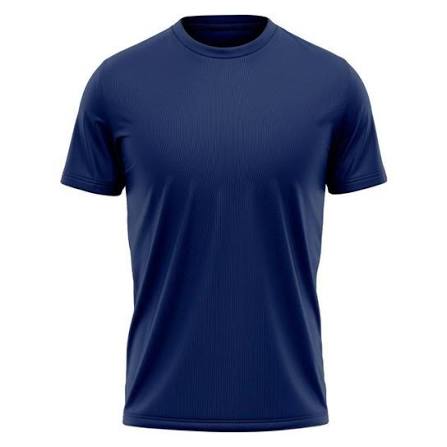
The results of the first test are presented below. For this test, an image obtained from the internet was used as input, which can be accessed by clicking here. To make it easier to visualize, the image is also shown below:
When running the code, the product name, description, and image URL are displayed in the terminal. However, to make the results easier to analyze in this post, the three retrieved images are presented below, ranked by similarity. The image on the left corresponds to the most similar product, while the image on the right represents the third result.
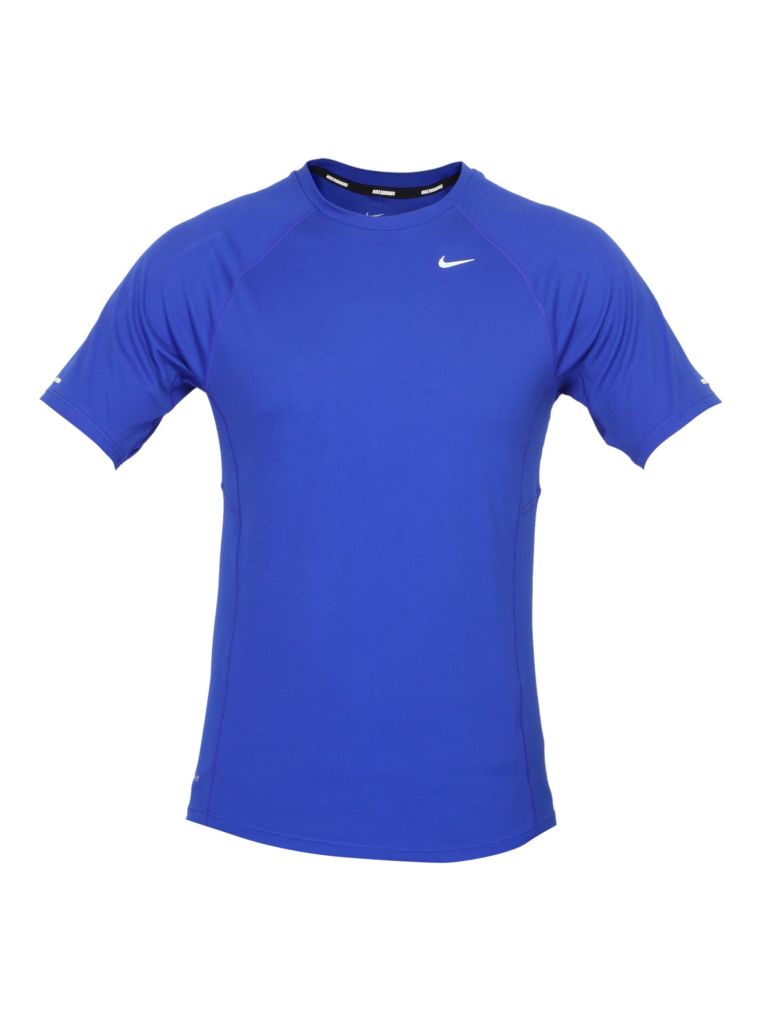
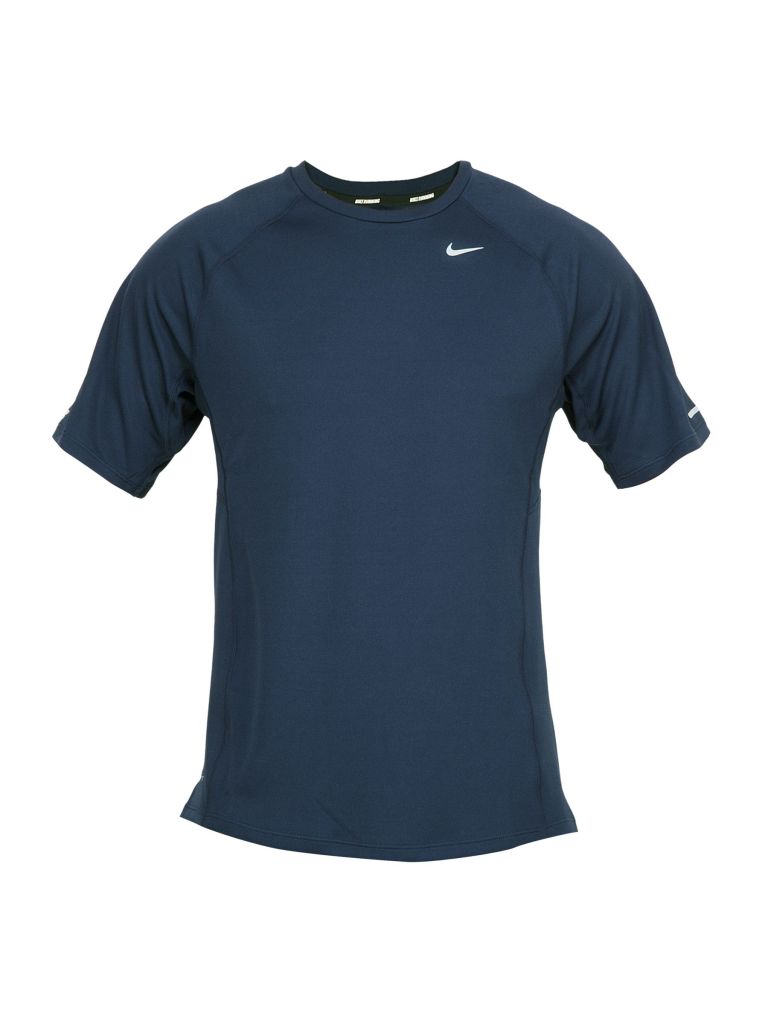
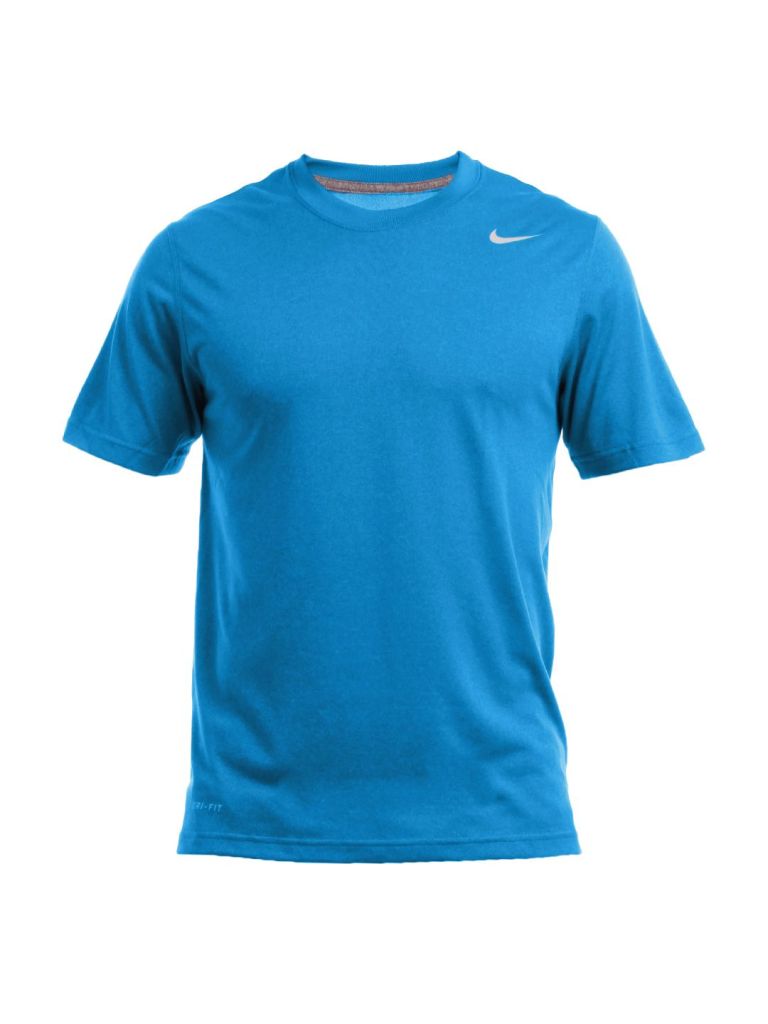
Notice that the retrieved products share visual characteristics with the input image, such as the style, colors, and shape of the T-shirts. In an e-commerce platform, for example, this approach could be used in recommendation or visual search systems, allowing users to find products similar to a reference image without needing to know the exact product name or description.
Finally, in the second test, a textual description was used as input: “A comfortable pair of white running shoes with a lightweight design and cushioned soles.” As in the first test, the results are presented below, ranked by similarity:
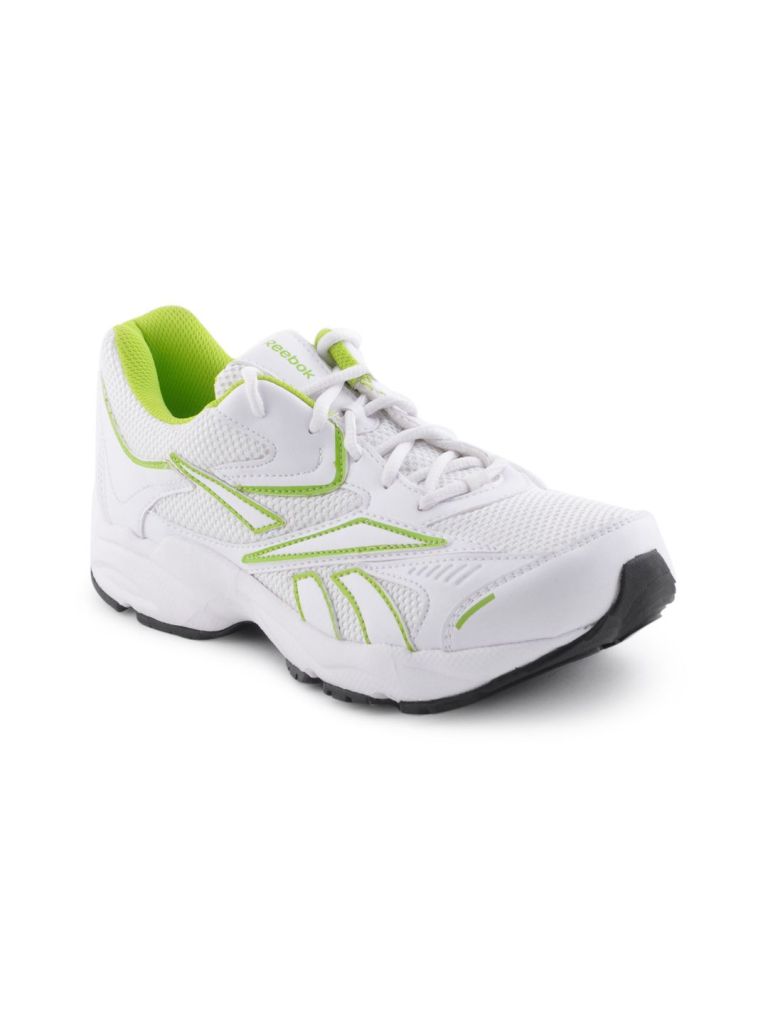
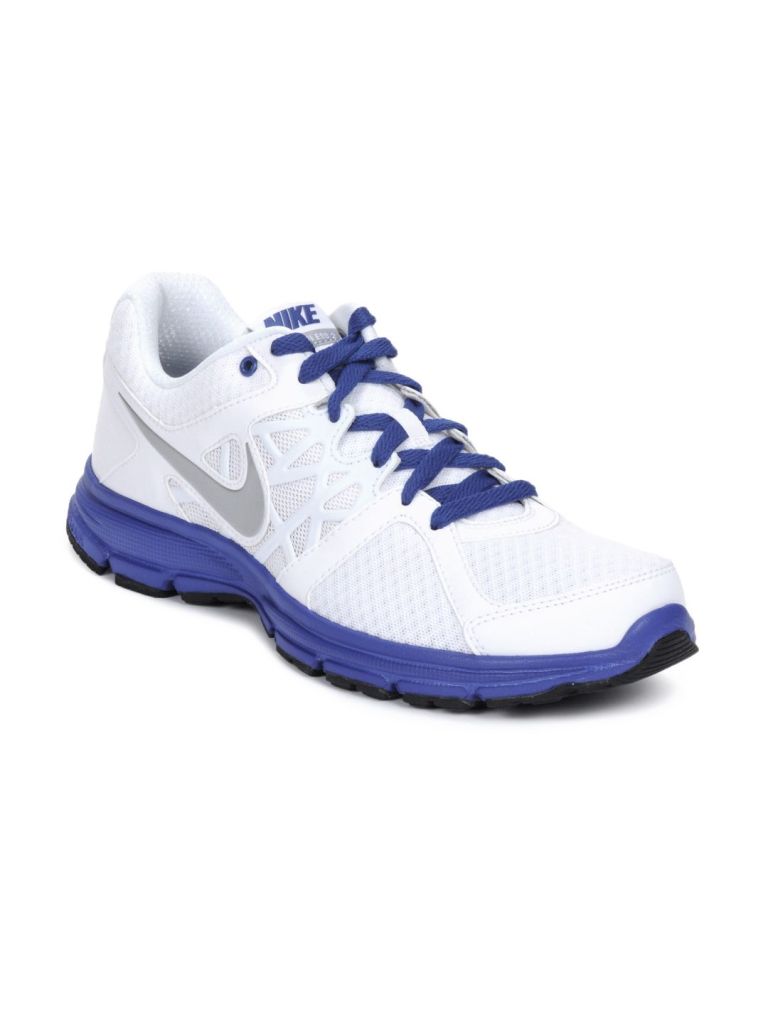
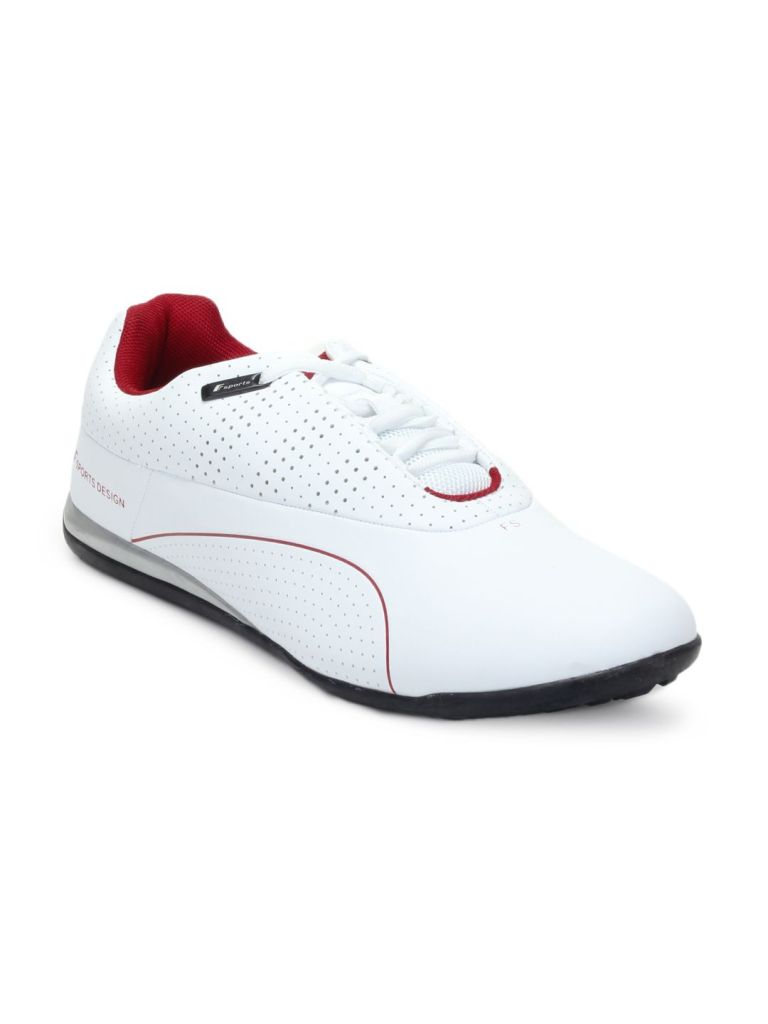
Notice that the retrieved products exhibit characteristics consistent with the provided description, such as the predominance of white and the sporty style of the shoes. This way, even without a reference image, users can describe the characteristics of the desired product and find options related to their query. This flexibility is particularly valuable for search and recommendation systems, as it facilitates product discovery and provides a more intuitive and accessible search experience.
These results highlight the potential of multimodal embeddings to retrieve similar content using different input modalities. This capability offers an important advantage for various applications by providing greater flexibility in search, allowing users to find what they are looking for without needing to know specific details such as names, brands, or models. From a business perspective, this flexibility can improve the user experience, facilitate the discovery of relevant content, and help solutions achieve their objectives more efficiently.


Leave a Reply